Computer Memory
Introduction
Computer memory is one of the fundamental components of a computer system. It provides the storage locations required to hold instructions, data, and intermediate results while the processor performs computational tasks.
Whenever a program runs, the processor needs access to both the instructions that make up the program and the data on which those instructions operate. Computer memory provides the mechanisms through which this information can be stored and made available to the processor.
Although memory is often associated with Random Access Memory (RAM), a modern computer system uses several levels and types of memory. Processor registers, cache memory, main memory, and secondary storage each serve different purposes within the overall memory and storage architecture.
These components differ in speed, capacity, cost, and persistence. Memory located closer to the processor is generally faster but smaller, while memory and storage farther from the processor generally provide greater capacity but higher access latency. This arrangement forms what is known as the memory hierarchy.
Understanding computer memory therefore involves more than understanding RAM. It requires an understanding of how memory has evolved, how different memory technologies are organized, and how the various levels of the memory hierarchy work together to support program execution.
Computer memory is also closely connected to operating systems, processor architecture, application execution, virtualization, and modern computing workloads. A strong understanding of memory concepts therefore provides an important foundation for studying computer architecture and operating systems.
What Is Computer Memory?
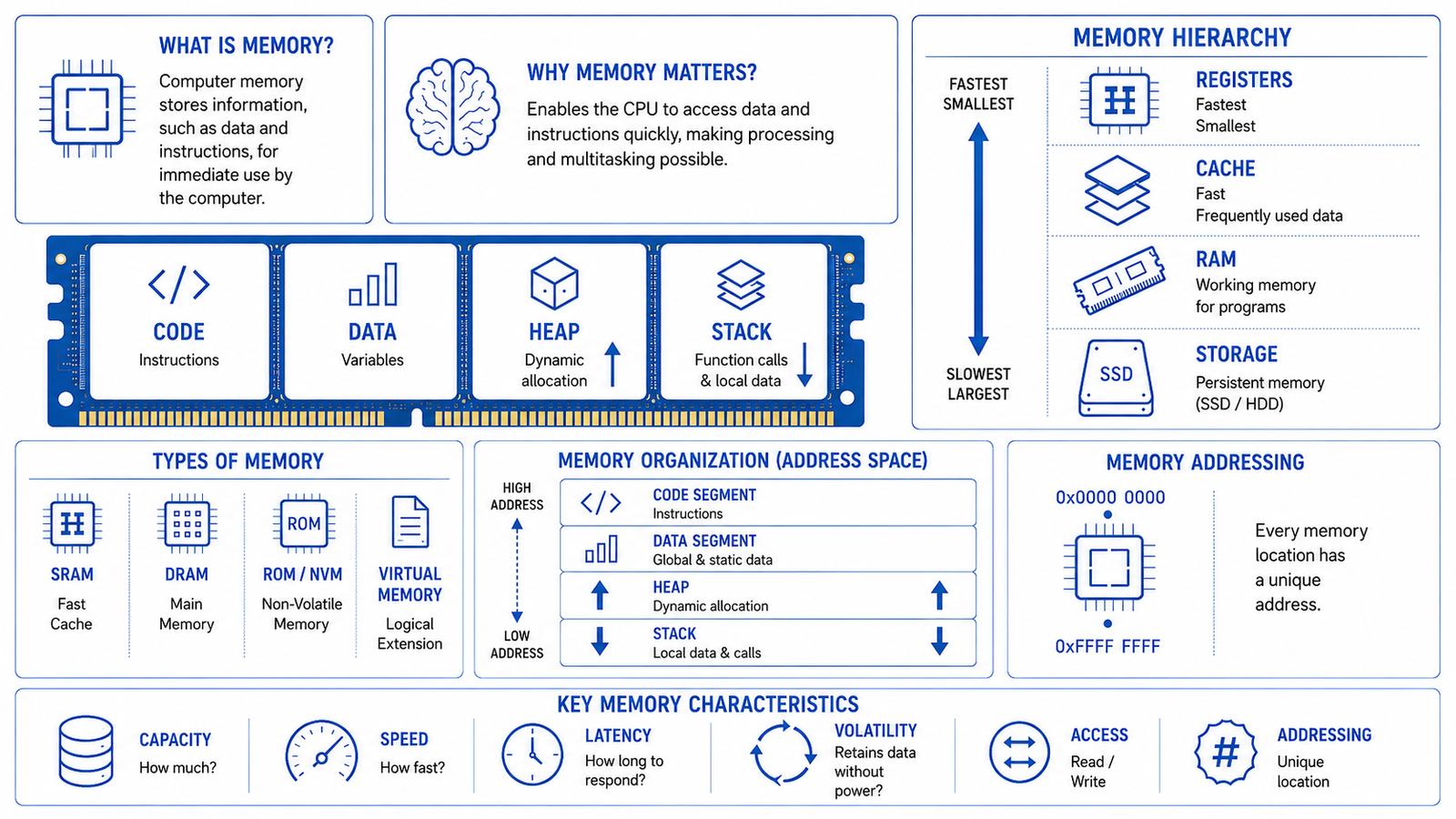
Computer memory is a component of a computer system that stores information, such as data and instructions, for use during program execution. It provides the working space required by the processor to access information while programs are running.
Memory can be implemented using different technologies and organized into different levels. These levels provide different characteristics in terms of speed, capacity, access time, and persistence.
Evolution of Computer Memory
Computer memory has evolved alongside the development of computing technology. As processors became faster and applications became more complex, computers required memory that could provide greater capacity while reducing access time and improving reliability.
Early computing systems used technologies such as magnetic drums, delay-line memory, and magnetic core memory. These technologies provided ways to store information but were considerably larger, slower, and more expensive than the semiconductor memory used in modern computers.
The development of semiconductor memory represented a major change in computer architecture. Memory could be implemented using electronic circuits, allowing memory components to become smaller, faster, and increasingly capable of storing large amounts of information.
As processor performance continued to increase, another challenge became apparent: the processor could often execute instructions faster than main memory could supply the required data and instructions. This performance gap contributed to the development of cache memory and increasingly sophisticated memory hierarchies.
Modern computer systems therefore do not rely on a single memory technology. Instead, they combine several levels of memory and storage, each optimized for a particular balance of speed, capacity, cost, and persistence.
Early Computer Memory
Early computers required specialized technologies to store binary information.
One example was magnetic drum memory, which used a rotating cylindrical surface coated with magnetic material to store information. Magnetic drums were used in some early computer systems as a form of primary or secondary storage.
Another technology was delay-line memory, which represented information as signals moving through a physical medium. The information could be retrieved as the signal reached a particular point in the delay line.
Magnetic core memory later became an important technology for computer main memory. It used small magnetic rings, or cores, to represent binary states. Core memory was more reliable and practical than many earlier technologies and remained widely used before semiconductor memory became dominant.
These early technologies are historically important because they demonstrate how the basic requirement of computer memory has remained consistent: the system must be able to store information and retrieve it when required.
Semiconductor Memory
Semiconductor memory uses electronic circuits implemented using semiconductor technology to store binary information.
The development of semiconductor memory allowed memory components to become significantly smaller and faster while increasing their storage density.
Two broad characteristics became particularly important:
- Volatile memory, which requires power to retain information.
- Non-volatile memory, which retains information even when power is removed.
Semiconductor memory became central to modern computer architecture and enabled the development of increasingly compact and powerful computing systems.
RAM became the primary working memory for general-purpose computers, while non-volatile semiconductor technologies became important for firmware, embedded systems, and persistent storage.
Modern Computer Memory
Modern computer systems use multiple levels of memory because different workloads require different combinations of speed and capacity.
At the processor level, registers provide extremely fast access to a very small amount of information. Cache memory provides additional high-speed storage between the processor and main memory. RAM provides a larger working area for operating systems and applications, while secondary storage provides persistent storage for much larger quantities of information.
The resulting architecture is a memory hierarchy.
The memory hierarchy allows the computer to balance several competing requirements:
- High processing speed
- Large storage capacity
- Low access latency
- Reasonable cost
- Persistent data storage
Modern memory technology continues to evolve as computing workloads become more demanding. Applications such as virtualization, large-scale databases, high-performance computing, and Artificial Intelligence require increasingly large amounts of memory and memory bandwidth.
Memory Hierarchy
A computer system contains multiple levels of memory rather than relying on a single memory component.
These levels form a memory hierarchy, with the fastest and smallest forms of memory positioned closest to the processor and larger, comparatively slower forms of memory located farther away.
A simplified hierarchy consists of:
- Registers
- Cache memory
- Main memory
- Secondary storage
The exact architecture differs between computer systems, but the fundamental principle remains the same.
As we move down the hierarchy, memory generally becomes:
- Larger in capacity
- Less expensive per unit of storage
- Slower to access
- More persistent
As we move toward the processor, memory generally becomes:
- Smaller in capacity
- Faster to access
- More expensive per unit of storage
- More closely integrated with processor operation
The memory hierarchy allows the system to provide the processor with rapid access to frequently required information while maintaining access to much larger amounts of data.
Registers
Registers are small, high-speed storage locations located inside the processor.
They hold information that the processor needs immediately during instruction execution. Depending on the processor architecture, registers may contain operands, intermediate results, addresses, instruction-related information, or processor state.
Because registers are located directly within the processor, they provide extremely fast access. However, their storage capacity is very limited compared with other memory levels.
Registers therefore serve a different purpose from RAM. RAM provides a relatively large working area for programs and data, while registers hold the small amount of information required directly by the processor during current operations.
General-Purpose Registers
General-purpose registers are used to store data and intermediate values during program execution.
For example, a processor may load values from memory into registers, perform an arithmetic or logical operation on those values, and then store the resulting value in a register or write it back to memory.
The number, size, and organization of general-purpose registers depend on the processor architecture.
Special-Purpose Registers
Special-purpose registers have specific roles within processor operation.
They may contain information related to instruction execution, program control, processor status, memory management, or other architectural functions.
Examples include registers associated with the program counter, stack management, processor status, and memory-management mechanisms. Their exact implementation varies between processor architectures.
Cache Memory
Cache memory is a high-speed memory located close to the processor. Its primary purpose is to reduce the time required to obtain frequently used instructions and data.
Modern processors can execute operations extremely quickly, while retrieving information from main memory generally takes more time. Cache memory helps reduce this performance difference by keeping frequently accessed information closer to the processor.
Cache operation relies heavily on a principle known as locality of reference.
Temporal Locality
Temporal locality refers to the tendency for recently accessed information to be accessed again within a relatively short period.
For example, a program may repeatedly execute the same instructions inside a loop. Keeping those instructions in cache allows the processor to access them quickly without repeatedly retrieving them from slower levels of memory.
Spatial Locality
Spatial locality refers to the tendency for memory locations near a recently accessed location to be accessed soon afterward.
Programs frequently process data stored in neighboring memory locations. Cache systems can take advantage of this behavior by retrieving a block of nearby data rather than retrieving only a single value.
The combination of temporal and spatial locality makes cache memory highly effective in improving processor performance.
L1 Cache
L1 cache is generally the smallest and fastest cache level in a processor.
It is typically located very close to the processor core and may be divided into separate instruction and data caches.
An instruction cache stores recently used program instructions, while a data cache stores recently accessed data.
Because L1 cache is designed for extremely fast access, its capacity is relatively limited compared with lower cache levels.
L2 Cache
L2 cache generally provides greater capacity than L1 cache while having somewhat higher access latency.
Depending on the processor architecture, L2 cache may be dedicated to an individual processor core or organized differently.
It acts as an additional high-speed layer between L1 cache and lower levels of the memory hierarchy.
If required information is not found in L1 cache, the processor may look for it in L2 cache before accessing lower levels.
L3 Cache
L3 cache is generally larger than L1 and L2 cache and has higher access latency.
In many multi-core processors, L3 cache is shared among multiple processor cores.
Its larger capacity allows more instructions and data to be retained close to the processor, reducing the frequency with which the system needs to access main memory.
The exact number of cache levels and their organization varies between processor architectures. Some processors may use additional cache levels or different cache organizations.
Main Memory
Main memory is commonly implemented using Random Access Memory (RAM) and provides the primary working area for operating systems and applications.
When an application is executed, the operating system loads the required instructions and data from persistent storage into main memory. The processor can then access this information during program execution.
Main memory provides considerably greater capacity than processor registers and cache, but it has higher access latency.
The amount of available main memory influences how much active program code and data a system can keep readily available at a given time.
Conventional RAM is volatile, meaning that its stored contents are normally lost when the system loses power.
Secondary Storage
Secondary storage provides persistent storage for operating systems, applications, documents, databases, media, and other information.
Unlike conventional RAM, secondary storage retains information when the system is powered off.
Common examples include:
- Solid-state drives (SSDs)
- Hard disk drives (HDDs)
- Other persistent storage technologies
Secondary storage generally provides much greater capacity than main memory, but access latency is typically higher.
When a program needs information that is stored persistently, the operating system can load that information into main memory so that the processor can work with it.
This distinction is important:
Main memory primarily supports active processing, while secondary storage primarily provides persistent storage.
Although memory and storage are sometimes used interchangeably in everyday conversation, they serve different roles within computer architecture.
Types of Computer Memory
Computer memory can be classified according to its technology, behavior, purpose, and ability to retain information without power.
One of the most important distinctions is between volatile memory and non-volatile memory.
Volatile memory requires power to maintain its stored information. RAM is the most common example used as working memory in general-purpose computing systems.
Non-volatile memory retains information without continuous power. Various forms of ROM, flash memory, and other non-volatile technologies fall into this category.
Random Access Memory (RAM)
Random Access Memory is the primary working memory used by most general-purpose computing systems.
The term random access means that the system can access individual memory locations using their addresses without having to read all preceding locations sequentially.
RAM temporarily stores information required by the operating system, applications, and active processes.
When a program is launched, relevant instructions and data are loaded from persistent storage into RAM. The processor can then access this information during execution.
RAM is generally volatile, so its contents are not retained when power is removed.
Two major types of RAM are Dynamic Random Access Memory (DRAM) and Static Random Access Memory (SRAM).
Dynamic Random Access Memory (DRAM)
DRAM stores each bit using a memory cell based on a capacitor and associated circuitry.
The electrical charge stored in the cell gradually changes over time. As a result, DRAM requires periodic refreshing to maintain its stored information.
DRAM provides relatively high storage density and is therefore widely used for main memory.
Its combination of capacity, performance, and cost makes it suitable for providing large amounts of working memory in computers and other computing systems.
Static Random Access Memory (SRAM)
SRAM stores each bit using a circuit that maintains its state while power is supplied.
Unlike DRAM, SRAM does not require the same periodic refresh operation to maintain its stored state.
SRAM generally provides faster access than DRAM but requires more physical circuitry per stored bit. As a result, it is more expensive and less dense.
These characteristics make SRAM particularly suitable for high-speed applications such as processor cache memory rather than large-capacity main memory.
Read-Only Memory (ROM)
Read-Only Memory is a general category of non-volatile memory historically associated with information that is primarily intended to be read rather than routinely modified.
Traditional ROM is programmed during manufacturing and is not normally modified during ordinary operation.
ROM and related technologies have historically been used to store firmware and other information that must remain available when the system is powered off.
Modern systems commonly use rewritable non-volatile memory, particularly flash memory, for firmware storage. Therefore, the term ROM is sometimes used broadly when discussing firmware or non-volatile memory even when the underlying technology is not traditional mask-programmed ROM.
Programmable Read-Only Memory (PROM)
PROM is a type of non-volatile memory that can be programmed after manufacturing.
Once programmed, traditional PROM cannot normally be erased and reprogrammed.
This makes PROM useful when information needs to be permanently programmed after the memory device has been manufactured.
Erasable Programmable Read-Only Memory (EPROM)
EPROM is a programmable non-volatile memory technology that can be erased and reprogrammed.
Traditional EPROM devices can be erased using ultraviolet light. After erasure, the device can be programmed again.
EPROM provided greater flexibility than one-time programmable memory but has largely been replaced by more convenient electrically erasable technologies.
Electrically Erasable Programmable Read-Only Memory (EEPROM)
EEPROM is a non-volatile memory technology that can be electrically erased and reprogrammed.
Unlike traditional EPROM, EEPROM does not require ultraviolet light for erasure.
EEPROM provided greater flexibility for systems that needed persistent information while also requiring the ability to update that information.
Non-Volatile Memory
Non-volatile memory refers broadly to memory technologies that retain stored information even when power is removed.
Non-volatile memory is important in systems that need information to persist between power cycles.
It can be used for firmware, configuration information, embedded systems, persistent data, and storage.
Flash Memory
Flash memory is a widely used form of non-volatile semiconductor memory.
It retains information without continuous power and can be electrically erased and programmed.
Flash memory is used in many modern computing and electronic systems, including solid-state drives, removable storage devices, embedded systems, and firmware storage.
Its lack of moving mechanical components makes flash-based storage fundamentally different from traditional mechanical disk storage.
Non-Volatile Random Access Memory (NVRAM)
NVRAM refers broadly to memory technologies that retain information without continuous power while providing characteristics associated with random-access memory.
Different NVRAM technologies use different physical mechanisms and have different performance, endurance, density, and cost characteristics.
The broader importance of NVRAM is its ability to provide persistent information storage while maintaining relatively fast access characteristics.
Understanding these different memory technologies provides the foundation for studying how computer systems organize, address, access, and manage memory.
Memory Organization
Computer memory is not simply a large collection of individual storage locations. It is organized into structured units that allow the processor and memory subsystem to store, identify, and retrieve information efficiently.
The organization of memory determines how individual bits are grouped, how data is represented, how memory locations are identified, and how larger memory components are constructed.
The basic concepts used to describe memory organization include memory cells, memory words, memory blocks, and memory modules.
Memory Cells
A memory cell is the fundamental physical element used to store a binary value.
At the most basic level, a memory cell represents one bit of information, which can have a value of either 0 or 1.
Different memory technologies use different physical mechanisms to implement memory cells. For example, DRAM uses a capacitor-based cell, while SRAM uses a circuit capable of maintaining a binary state.
Large memory devices contain a very large number of individual cells organized into structured arrangements.
The physical implementation of a memory cell depends on the memory technology, but its logical purpose remains the same: to store binary information.
Memory Words
A memory word is a group of bits that a processor or memory system treats as a unit.
The size of a word is related to the architecture of the computer system. Common word sizes include 16 bits, 32 bits, and 64 bits, although other sizes exist.
A processor’s word size influences several aspects of its architecture, including:
- The amount of data that can be processed in a typical operation
- The size of many processor registers
- The representation of addresses
- The organization of instructions and data
A 64-bit processor, for example, is generally designed to work naturally with 64-bit data values and addresses, although the actual addressable physical memory may be less than the theoretical address range.
Memory Blocks
A memory block is a group of adjacent memory locations treated as a unit for certain memory operations.
Memory blocks are particularly important in cache memory. When a processor requests information that is not currently available in cache, the memory system may retrieve a larger block containing the requested information and nearby locations.
This behavior takes advantage of spatial locality, because programs frequently access memory locations that are close to one another.
The size of a memory block can influence cache performance and overall memory efficiency. Larger blocks can take advantage of spatial locality but may also result in data being brought into the cache that is not ultimately needed.
Memory Modules
A memory module is a physical assembly containing memory chips and associated circuitry.
Instead of installing individual memory chips directly into a system, modern computers commonly use memory modules that contain multiple memory devices.
Examples include various forms of DIMMs used in desktop and server systems.
A memory module provides a practical way to install, replace, and expand system memory while allowing multiple memory devices to operate together as part of the memory subsystem.
The organization of memory modules depends on the system architecture, memory technology, motherboard design, and memory controller.
Memory Addressing
For a processor to use memory, it must be able to identify where information is stored.
Memory addressing is the mechanism through which memory locations are identified using addresses.
Each address corresponds to a location within an addressable memory space. The processor generates or uses addresses when it needs to read information from or write information to memory.
Memory addressing is therefore fundamental to program execution.
When an instruction requires data from memory, the system must determine the appropriate address, translate it when necessary, and access the corresponding memory location.
Memory Addresses
A memory address is a value used to identify a particular location within a memory address space.
The processor uses addresses to distinguish one memory location from another.
In a simplified byte-addressable system, each individual byte has a unique address. If one byte is located at address 1000 and another byte is located at address 1001, the two locations can be accessed independently.
The actual addressing mechanism depends on the processor architecture and memory system.
Memory addresses are represented using binary values internally, although hexadecimal notation is commonly used when humans need to examine or discuss them.
For example, a memory address may be represented as:
0x7FF0
The 0x prefix conventionally indicates hexadecimal notation.
Address Space
An address space is the complete range of addresses that a processor or system can use to identify memory locations.
The size of the address space is determined by the number of address bits available.
For an address containing n bits, the theoretical number of distinct addresses is:
2ⁿ
For example, a system with 32-bit addresses has a theoretical address space of:
2³² = 4,294,967,296 address values
If the system is byte-addressable, this corresponds to a theoretical address range of approximately 4 GiB.
A 64-bit address provides a much larger theoretical address space:
2⁶⁴ address values
However, a 64-bit processor does not necessarily implement all 64 address bits in hardware. Modern processor architectures may implement a smaller number of address bits, and operating systems and hardware platforms may impose additional limits.
Therefore, 64-bit architecture does not automatically mean that a computer can physically install or use 2⁶⁴ bytes of RAM.
Physical Address Space
Physical address space represents addresses corresponding to locations in the physical memory system and other addressable hardware resources.
Physical memory includes actual RAM locations that can be accessed by the memory subsystem.
The processor and operating system may use physical addresses when referring to locations in the underlying hardware memory system.
Physical address space can also include regions assigned to hardware devices through mechanisms such as memory-mapped I/O.
The physical address space is therefore not necessarily identical to the amount of RAM physically installed in a system.
Logical Address Space
A logical address space is an address space used by software or the processor architecture before addresses are mapped to their corresponding physical locations.
In modern systems, applications commonly operate using virtual addresses rather than directly using physical memory addresses.
The operating system and processor’s memory-management mechanisms translate these addresses into appropriate physical addresses.
This separation provides important benefits, including process isolation, flexible memory management, and the ability to provide each process with its own address space.
The terminology used for logical, virtual, and physical addresses can vary between processor architectures and operating-system documentation. In modern general-purpose systems, virtual address is commonly used when referring to addresses generated by application software.
32-Bit and 64-Bit Addressing
The transition from 32-bit to 64-bit architectures significantly expanded the address space available to modern computing systems.
A 32-bit address can represent:
2³² = 4,294,967,296
distinct address values.
In a byte-addressable system, this corresponds to approximately 4 GiB of theoretical address space.
A 64-bit address can theoretically represent:
2⁶⁴
distinct address values, which is vastly larger.
However, practical systems typically implement fewer physical address bits than the full 64-bit theoretical range. The usable address space is determined by the processor architecture, operating system, motherboard, memory controller, and other system limitations.
The move to 64-bit architectures therefore provided a much larger address space and enabled modern systems to work efficiently with large amounts of memory.
It also affected processor registers, operating systems, application binaries, and data structures.
Memory Access
Memory access refers to the process through which the processor or another system component reads information from or writes information to memory.
At a basic level, memory operations involve two fundamental activities:
- Read: retrieving information from a memory location.
- Write: storing information in a memory location.
The processor does not generally access every memory level in the same way. Depending on the system architecture and where the required information is located, an access may involve registers, cache, main memory, or persistent storage.
Read Operation
A memory read operation retrieves information from a specified memory location.
Conceptually, the processor provides an address identifying the required location. The memory subsystem uses that address to locate the corresponding data and returns the data to the processor or another requesting component.
For example, when an instruction needs a value stored in memory, the processor may generate a memory address for that value. The memory hierarchy then determines whether the required information is already available in an appropriate cache or whether it must be obtained from a lower level of memory.
A successful cache lookup can significantly reduce the time required to obtain the data.
Write Operation
A memory write operation stores information at a specified memory location.
The processor provides the destination address and the data that needs to be stored. The memory subsystem then updates the appropriate location.
Modern processors use cache systems and sophisticated memory-management mechanisms, so a write does not necessarily mean that the processor immediately writes the information directly to physical DRAM.
Depending on the cache architecture and memory policy, the modified data may initially be stored in cache and later propagated to lower levels of the memory hierarchy.
Memory Access Time
Memory access time is the amount of time required for a memory operation to provide or store the requested information.
Access time varies significantly between different levels of the memory hierarchy.
Registers generally provide extremely fast access, followed by cache memory, main memory, and then persistent storage.
The difference in access time between these levels is one of the main reasons why computer systems use a memory hierarchy.
Reducing the effective memory access time is an important objective of computer architecture because processor performance depends heavily on how quickly required instructions and data can be supplied.
Memory Latency
Memory latency refers to the delay between initiating a memory access and receiving the requested information or completing the relevant operation.
Latency is particularly important for workloads involving frequent memory accesses.
A processor may be capable of executing an instruction very quickly, but if it repeatedly has to wait for data from a slower memory level, overall performance can be significantly affected.
Cache memory helps reduce effective memory latency by keeping frequently accessed information closer to the processor.
Latency should be distinguished from bandwidth. A memory system can have high bandwidth while still having relatively high latency.
Memory Bandwidth
Memory bandwidth represents the amount of data that can be transferred between memory and the processor or other components over a given period.
It is commonly expressed using units such as gigabytes per second (GB/s).
Higher memory bandwidth is particularly important for workloads that process large amounts of data continuously.
Examples include:
- Scientific computing
- High-performance computing
- Graphics processing
- Large databases
- Data analytics
- Artificial Intelligence and machine learning
Memory bandwidth and memory latency represent different performance characteristics.
Latency concerns how long it takes to obtain data, while bandwidth concerns how much data can be transferred over time.
A memory system therefore needs to balance both characteristics to provide effective overall performance.
Relationship Between Memory Organization and Performance
The way memory is organized has a direct influence on how efficiently a computer system can execute programs.
A well-designed memory hierarchy allows frequently used information to remain close to the processor while less frequently used information can remain in larger and slower memory levels.
Several factors contribute to memory performance, including:
- Cache capacity
- Cache hit rate
- Memory latency
- Memory bandwidth
- Memory access patterns
- Memory bus characteristics
- Memory controller behavior
- Application workload
For example, an application that repeatedly accesses nearby memory locations can benefit from spatial locality and cache mechanisms. An application that accesses memory in a highly unpredictable pattern may experience more cache misses and greater memory latency.
This is why memory performance cannot be evaluated simply by looking at the amount of RAM installed in a system.
A computer with more RAM does not necessarily have faster memory performance. Capacity, latency, bandwidth, cache behavior, processor architecture, and workload characteristics all contribute to overall memory performance.
Understanding memory organization and access therefore provides an important foundation for understanding how the processor, operating system, and applications work together.
Virtual Memory
Virtual memory is a memory-management technique that allows an operating system to provide each process with its own virtual address space while using physical memory as the underlying hardware resource.
Instead of requiring an application to work directly with physical memory addresses, the operating system and processor work together to translate virtual addresses used by programs into physical addresses associated with actual memory locations.
This abstraction provides several important benefits. It allows applications to operate within their own address spaces, enables the operating system to manage physical memory efficiently, and allows programs to use an address space that can be larger than the amount of physical RAM currently available to them.
Virtual memory is therefore an important concept connecting computer architecture, processor memory-management mechanisms, and operating-system memory management.
Virtual Address Space
A virtual address space is the range of virtual addresses available to a process.
Each process can be provided with its own virtual address space, which gives the process the appearance of having access to a dedicated memory environment.
For example, two different processes may use the same virtual address value while the operating system maps those addresses to different physical memory locations.
This separation prevents applications from normally needing to know where their data is physically located in RAM.
The virtual address space can contain areas used for:
- Program instructions
- Global and static data
- Dynamically allocated memory
- Function call stacks
- Shared libraries
- Other operating-system-managed regions
The exact organization depends on the operating system, processor architecture, executable format, and application.
Physical Memory
Physical memory refers to the actual memory resources available in the hardware, primarily main memory implemented using RAM.
Unlike virtual memory, physical memory corresponds to real hardware locations within the system’s memory subsystem.
The operating system manages physical memory and determines which portions are assigned to processes and other system components.
A process may therefore operate using virtual addresses without directly knowing which physical memory locations currently contain its data.
This separation provides flexibility because the operating system can change physical memory assignments without requiring the application to change the addresses it uses.
Paging
Paging is a common technique used to implement virtual memory.
In a paging system, virtual memory is divided into fixed-size units called pages, while physical memory is divided into corresponding units called frames.
The operating system maintains information that maps virtual pages to physical frames.
When a processor generates a virtual address, the memory-management hardware uses the appropriate translation information to determine the corresponding physical location.
Paging provides several benefits:
- Efficient physical memory management
- Process isolation
- Flexible allocation of memory
- Support for virtual address spaces
- Ability to move pages between physical memory and secondary storage when necessary
The page size is determined by the processor architecture and operating system. Some systems support multiple page sizes for different workload requirements.
Pages and Frames
A page is a fixed-size unit of virtual memory.
A frame, sometimes called a page frame, is a fixed-size unit of physical memory.
Pages and frames normally have the same size so that a virtual page can be mapped to a physical frame.
For example, if a system uses a page size of 4 KiB, physical memory is divided into 4 KiB frames and virtual address spaces are divided into 4 KiB pages.
The operating system can then map individual virtual pages to available physical frames.
A process does not normally need to know which physical frame contains a particular page.
Page Tables
A page table contains information used to translate virtual page numbers into physical frame numbers.
The operating system maintains page-table structures for processes, while the processor’s memory-management hardware uses these structures during address translation.
A simplified translation can be understood as:
Virtual Address → Virtual Page + Page Offset
The virtual page number is used to identify the appropriate page-table entry, while the page offset identifies the specific location within that page.
The corresponding page-table entry provides information about the physical frame associated with the virtual page.
Modern processor architectures can use multi-level page tables and other techniques to manage large virtual address spaces efficiently.
Page Faults
A page fault occurs when a process attempts to access a virtual page that is not currently available in the required physical memory location.
A page fault does not necessarily indicate an error or failure.
In a virtual-memory system, a page may not currently be resident in physical memory because the operating system has moved it to secondary storage or because the page has not yet been loaded into physical memory.
When a page fault occurs, the processor transfers control to the operating system, which determines how the requested page should be handled.
If the page is available elsewhere, the operating system can load it into a suitable physical memory frame and update the relevant page-table information before allowing execution to continue.
Because accessing secondary storage is considerably slower than accessing RAM, excessive page faults can significantly reduce system performance.
Memory Swapping
Memory swapping refers to moving memory contents between physical memory and secondary storage as part of memory-management operations.
When physical memory becomes constrained, an operating system may move some memory contents out of RAM so that the physical memory can be used for other purposes.
Later, the required information may need to be brought back into physical memory.
The exact implementation varies between operating systems. Some systems use terminology such as swap space, while others use paging files or related mechanisms.
Swapping can allow a system to support workloads that exceed the amount of immediately available physical memory, but excessive reliance on secondary storage can significantly reduce performance because storage access is much slower than RAM access.
Memory Management
Memory management is the process of organizing, allocating, tracking, and releasing memory resources during system operation.
Memory management involves cooperation between the processor, operating system, memory-management hardware, and applications.
The operating system must determine how available memory is assigned to processes while ensuring that different processes can operate within their appropriate memory spaces.
Effective memory management is important for:
- Efficient use of physical memory
- Application execution
- Multitasking
- Process isolation
- System stability
- Resource utilization
Memory management also involves handling situations where memory is allocated and released repeatedly during application execution.
Memory Allocation
Memory allocation is the process of assigning memory space for data or program requirements.
Memory may be allocated for different purposes, including:
- Program instructions
- Global variables
- Local variables
- Dynamically created data
- Operating-system structures
- Buffers and other data structures
The method used to allocate memory depends on the type of data and how long the memory needs to remain available.
Memory can be allocated statically or dynamically.
Static Memory Allocation
Static memory allocation refers to memory whose size and lifetime are determined before or during program loading and are generally associated with the program’s fixed data requirements.
Global variables and certain static variables are common examples.
The memory required for these objects can be determined without repeatedly requesting and releasing memory during program execution.
Static allocation can simplify memory management because the lifetime of the allocated data is generally tied to the program or a defined static scope.
Dynamic Memory Allocation
Dynamic memory allocation allows a program to request memory while it is executing.
This is useful when the amount of memory required cannot be determined in advance or when data structures need to change in size during program execution.
Dynamic allocation is commonly associated with the heap.
For example, a program may allocate memory for a data structure when it determines that the data structure is required and release that memory when it is no longer needed.
Dynamic memory allocation provides flexibility but requires careful management.
Memory Deallocation
Memory deallocation is the process of releasing memory that is no longer required.
In manually managed memory systems, the application or programmer is responsible for ensuring that dynamically allocated memory is released appropriately.
Some programming environments provide automatic memory-management mechanisms, such as garbage collection, which identify memory that is no longer reachable by the application and reclaim it.
Proper deallocation is important because memory that remains allocated unnecessarily can reduce the amount of memory available to other operations.
Memory Fragmentation
Memory fragmentation occurs when available memory becomes divided into smaller regions in ways that can make efficient allocation more difficult.
Fragmentation can occur in different forms, with internal fragmentation and external fragmentation being two important concepts.
Internal Fragmentation
Internal fragmentation occurs when allocated memory contains unused space within an allocated region.
For example, if memory is allocated in fixed-size blocks and an application requires slightly less than the size of a block, part of that allocated block may remain unused.
The unused space is inside the allocated region, which is why it is called internal fragmentation.
Paging systems can also experience a form of internal fragmentation because a process may not use every byte within its final allocated page.
External Fragmentation
External fragmentation occurs when available memory exists but is divided into separate free regions.
The total amount of free memory may be sufficient for a new allocation, but the available regions may not be contiguous when a contiguous allocation is required.
Dynamic allocation systems can experience external fragmentation as memory is repeatedly allocated and released.
Memory-management techniques can reduce the effects of fragmentation depending on the architecture and allocation strategy.
Memory Layout of a Program
When a program is loaded and executed, its address space is organized into different logical regions.
The exact layout varies between operating systems, processor architectures, executable formats, and programming environments. However, a typical process address space contains regions associated with:
- Program instructions
- Global and static data
- Dynamically allocated memory
- Function call information and local variables
The commonly discussed regions are the code segment, data segment, heap, and stack.
Understanding this layout is important because each region serves a different purpose during program execution.
Code Segment
The code segment, also known as the text segment, contains the executable instructions of a program.
These instructions represent the machine-level operations that the processor executes.
The code segment is generally associated with the compiled program’s executable instructions and may include code loaded from executable files and shared libraries.
The organization and permissions of the code region depend on the operating system and execution environment.
Data Segment
The data segment contains global and static data associated with a program.
It can be broadly divided into initialized and uninitialized data.
Initialized Data
Initialized data contains global or static variables that have explicit initial values.
For example, a program may define a global variable and assign it an initial value before execution begins.
The required initial values are generally represented within the executable or associated program image and are made available when the program is loaded.
Uninitialized Data
Uninitialized data contains global or static variables that do not require explicit initial values in the program source.
This region is commonly associated with the BSS segment.
The operating system or program loader prepares the required memory region during program initialization, generally ensuring that the variables have an appropriate initial state.
Separating initialized and uninitialized data allows executable formats and loaders to represent program data efficiently.
Heap
The heap is a region of memory used for dynamic memory allocation during program execution.
When a program requests memory dynamically, the memory-management mechanisms used by the programming environment can obtain space from the heap.
The size and contents of the heap can change during execution.
For example, an application that creates objects dynamically may require additional heap memory as new objects are created and may release that memory when those objects are no longer required.
The heap is therefore particularly important for applications that use dynamically sized data structures.
Stack
The stack is a region of memory commonly used to manage function calls and temporary execution information.
When a function is called, information such as local variables, function parameters, saved processor state, and return-related information may be associated with a stack frame.
Each function call can create a new stack frame. When the function returns, the associated stack frame can be removed.
The stack therefore provides a structured mechanism for managing nested function calls.
The stack generally follows a last-in, first-out (LIFO) model.
For example, if function A calls function B, and function B calls function C, the execution context associated with C must be handled before the context associated with B, which in turn must be handled before A’s calling context is completed.
Stack size is limited. Programs that create excessively deep call chains or allocate unusually large local data structures on the stack can exhaust available stack space.
Relationship Between Virtual Memory and Program Layout
Virtual memory and program memory layout work together to provide applications with a structured address space.
A program may see its code, data, heap, and stack as distinct regions within its virtual address space. These regions do not necessarily correspond to contiguous physical memory locations.
The operating system can map different virtual pages to different physical frames.
This means that two adjacent virtual memory regions may be stored in physically separated locations in RAM, while the application continues to operate using the virtual addresses provided to it.
The separation between virtual and physical memory therefore allows the operating system to manage memory more flexibly.
It can also allow memory pages to be loaded, moved, or reclaimed without requiring the application to know the physical location of its data.
Relationship Between Memory Management and Program Execution
Memory management is closely tied to program execution.
When an application starts, the operating system creates an execution environment and establishes the process’s address space. Program instructions and required data are made available through the memory-management system.
As the application executes:
- Instructions are fetched for processing.
- Data is loaded into processor registers and cache as required.
- Additional memory may be allocated dynamically.
- Function calls create and remove stack frames.
- Data may move through different levels of the memory hierarchy.
- Memory that is no longer required may be released.
These activities occur continuously while applications execute.
The processor, memory subsystem, and operating system therefore work together to provide the application with the memory environment it requires.
Understanding this relationship is essential for studying operating systems, application execution, programming languages, virtualization, and computer architecture.
Memory and Computer Architecture
Computer memory cannot be considered independently from the processor and other components of a computer system. The processor, memory subsystem, buses or interconnects, memory controller, and input/output mechanisms work together to execute programs and process data.
The relationship between the processor and memory is particularly important because the processor continuously needs instructions and data during execution.
Computer architecture therefore defines how memory is addressed, accessed, transferred, and managed within the overall system.
CPU and Memory Interaction
The Central Processing Unit (CPU) executes instructions, but most instructions require access to data or other information stored outside the processor’s immediate execution resources.
During program execution, the CPU may need to:
- Fetch instructions
- Read data
- Perform calculations
- Store intermediate results
- Write results back to memory
Registers provide the CPU with immediate storage for values required during execution. Cache memory provides additional high-speed storage, while main memory provides a much larger working area.
A simplified sequence of execution can be understood as:
- The CPU fetches an instruction.
- The instruction is decoded.
- Required data is obtained from the appropriate memory level.
- The CPU performs the required operation.
- The result is stored in a register or memory.
In a modern processor, these activities are highly optimized and may overlap through mechanisms such as pipelining, out-of-order execution, and speculative execution.
The memory hierarchy plays an important role in keeping the CPU supplied with the information it needs.
Memory Bus
A memory bus refers to the communication paths used to transfer information between the processor or memory controller and memory.
Traditional descriptions often divide a bus into components such as:
- Address bus
- Data bus
- Control bus
The address bus carries information identifying a memory location.
The data bus carries the data being transferred.
Control signals coordinate operations such as reading and writing.
Modern computer systems may use more sophisticated point-to-point interconnects rather than a single shared bus. Therefore, the traditional bus model is useful for understanding the basic concepts, while actual implementations vary significantly between processor and system architectures.
The characteristics of the memory interface influence how quickly and efficiently data can move between the processor and memory.
Memory Controller
The memory controller manages communication between the processor or system interconnect and main memory.
In modern systems, the memory controller is commonly integrated into the processor or closely associated with it.
The memory controller performs functions such as:
- Managing memory access requests
- Controlling communication with memory devices
- Scheduling memory operations
- Managing timing requirements
- Handling memory channels
- Supporting specific memory technologies
The memory controller therefore acts as an important component between the processor’s memory requests and the physical memory devices.
Its design can influence memory latency, bandwidth, and overall system performance.
Memory-Mapped I/O
Memory-mapped I/O is a mechanism in which hardware device registers are assigned addresses within an address space that the processor can access using memory-access operations.
Instead of requiring a completely separate addressing mechanism for every device, certain address ranges can be associated with hardware devices.
When the processor performs a read or write to one of these addresses, the operation may be handled by the corresponding hardware device rather than ordinary RAM.
For example, a device register may be mapped to a particular physical address range. Writing a value to that address can cause the device to perform a specific operation, while reading from the address can provide information about the device’s state.
Memory-mapped I/O therefore extends the concept of addressing beyond conventional main memory and provides a standardized mechanism through which the processor can interact with hardware components.
Memory in Modern Computing
The fundamental principles of computer memory remain relevant even as computing environments have changed significantly.
Modern operating systems, virtualization platforms, cloud environments, and Artificial Intelligence systems all depend on memory to store and process information.
However, modern workloads have increased the importance of memory capacity, bandwidth, latency, memory management, and efficient resource allocation.
Memory in Operating Systems
Operating systems play a central role in managing memory resources.
The operating system is responsible for allocating memory to processes, maintaining process address spaces, managing virtual memory, and coordinating the use of physical memory.
Important operating-system memory functions include:
- Process memory management
- Virtual address-space management
- Physical memory allocation
- Paging
- Memory protection and isolation
- Shared memory management
- Memory reclamation
Operating systems also need to coordinate memory usage among multiple processes.
For example, when several applications are running simultaneously, the operating system must ensure that each process receives appropriate memory resources while maintaining separation between their address spaces.
This allows multiple applications to execute concurrently without requiring each application to manage the entire physical memory of the computer.
Memory in Virtualization
Virtualization introduces additional layers of memory abstraction.
A virtual machine operates as if it has its own processor, memory, storage, and other hardware resources. However, the physical resources are actually managed by the underlying host system.
A virtual machine therefore has a view of memory that is different from the physical memory installed in the host.
The virtualization layer must translate and manage memory between the guest operating system and the underlying physical system.
Modern virtualization technologies can use hardware-assisted mechanisms to improve the efficiency of memory translation and management.
Memory virtualization allows multiple virtual machines to share physical memory resources while maintaining logical separation between their environments.
Memory in Cloud Computing
Cloud computing relies heavily on virtualization and resource abstraction.
Memory is treated as a resource that can be allocated to virtual machines, containers, applications, and other workloads according to their requirements.
Cloud environments may dynamically allocate and adjust memory resources as workloads change.
For example, a workload experiencing increased demand may require additional memory, while an inactive workload may require fewer resources.
Efficient memory allocation is therefore important for both performance and resource utilization in cloud environments.
Cloud platforms can also use different memory configurations and architectures depending on workload requirements.
Applications that perform large-scale data processing may require substantial memory capacity and bandwidth, while other workloads may be more sensitive to latency.
Memory in Artificial Intelligence
Artificial Intelligence workloads have increased the importance of memory capacity and memory bandwidth.
Machine learning and deep learning systems often work with large datasets and model parameters. These workloads can require substantial amounts of memory to store:
- Model parameters
- Input datasets
- Intermediate activations
- Training information
- Temporary computational data
AI systems may use different types of processors and accelerators, including CPUs, GPUs, and specialized AI accelerators.
These components can have their own memory architectures and memory resources.
For example, GPUs typically use high-bandwidth memory technologies to provide the large data-transfer rates required by parallel computational workloads.
Memory bandwidth can be particularly important in AI workloads because computational units may need to access large quantities of data continuously.
As AI models become larger and workloads become more complex, memory capacity, bandwidth, latency, and efficient data movement increasingly influence system performance.
Memory Performance Considerations
The performance of a memory system cannot be described using a single measurement.
Several characteristics influence how effectively a computer can access and process information.
Important memory performance factors include:
Capacity
Memory capacity determines how much information can be stored within a particular memory level.
Greater capacity allows a system to keep more active data available, potentially reducing the need to access slower storage.
However, increasing capacity alone does not guarantee higher overall performance.
Latency
Memory latency represents the delay associated with accessing information.
Lower latency allows required data to be obtained more quickly.
Processor caches are designed to provide much lower latency than main memory, although their capacity is considerably smaller.
Bandwidth
Memory bandwidth represents the amount of data that can be transferred over a given period.
High bandwidth is particularly important for workloads that continuously process large volumes of data.
Access Patterns
The way an application accesses memory can have a major influence on performance.
Applications that demonstrate strong temporal and spatial locality can benefit significantly from caching.
Applications with irregular or unpredictable access patterns may experience more cache misses and greater memory latency.
Memory Efficiency
Memory efficiency refers to how effectively available memory resources are utilized.
Efficient memory usage can reduce unnecessary allocations, improve cache behavior, and allow more workloads to operate within available resources.
Poor memory utilization can increase resource consumption and reduce overall system performance.
Memory and the Future of Computing
Computer memory continues to evolve as computing systems become more powerful and workloads become more demanding.
Traditional distinctions between processor memory, main memory, and storage are increasingly being complemented by new memory technologies and architectural approaches.
Emerging computing environments are placing greater emphasis on:
- Higher memory bandwidth
- Lower memory latency
- Greater memory capacity
- Improved energy efficiency
- Persistent memory technologies
- High-bandwidth memory
- Memory pooling and resource sharing
- Processing closer to data
These developments are particularly relevant to high-performance computing, large-scale data processing, cloud computing, and Artificial Intelligence.
The continuing evolution of memory demonstrates that memory architecture is not simply a historical component of computer design. It remains an active area of innovation that directly influences the capabilities and performance of modern computing systems.
Conclusion
Computer memory is one of the fundamental components of computer architecture and plays a central role in program execution and data processing.
From early technologies such as magnetic core memory to modern semiconductor memory, the development of memory has been driven by the need for greater capacity, faster access, improved reliability, and more efficient integration with increasingly powerful processors.
Understanding the memory hierarchy provides the foundation for understanding how different memory levels work together. Registers provide extremely fast access to a small amount of information, cache memory reduces the effective cost of frequently accessed data, main memory provides the primary working environment for applications, and secondary storage provides persistent capacity.
Memory organization and addressing explain how information is structured and identified, while memory access concepts such as latency and bandwidth help explain system performance.
Virtual memory and memory management extend these concepts by allowing operating systems to provide processes with structured address spaces and efficiently manage available physical memory. Program memory layouts further demonstrate how code, data, heap, and stack regions support application execution.
The role of memory also extends beyond traditional personal computers. Operating systems, virtualization platforms, cloud environments, and Artificial Intelligence systems all depend on efficient memory architectures.
Although memory is one of the oldest concepts in computing, it remains one of the most important areas of computer architecture. Understanding how memory is organized, addressed, accessed, and managed provides a strong foundation for understanding modern computer systems and the technologies built upon them.