Linux Privilege Escalation
Introduction
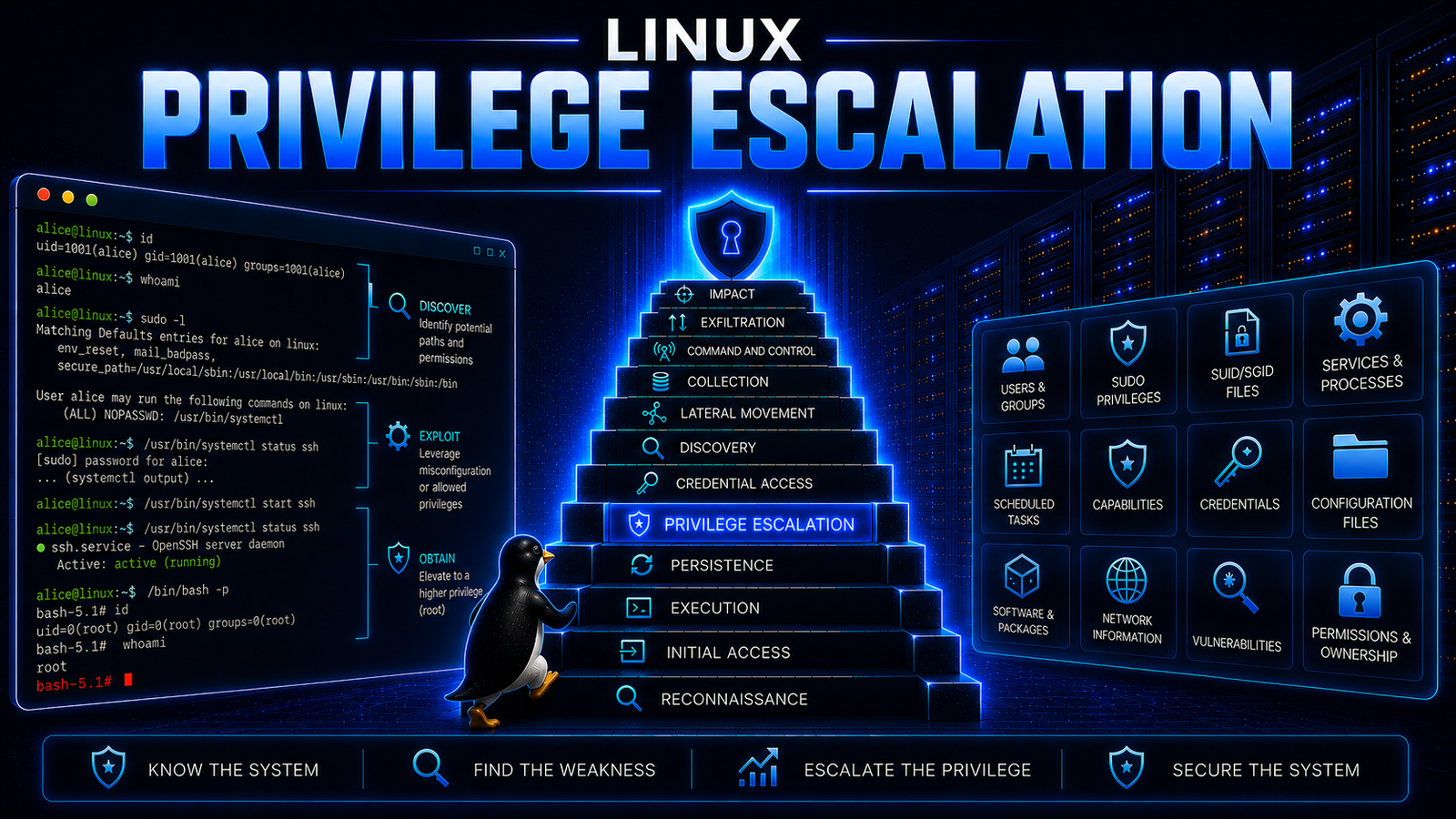
Linux privilege escalation refers to the exploitation of vulnerabilities, misconfigurations, or weaknesses in a Linux system to obtain privileges beyond those assigned to a user or process. It is commonly associated with situations in which an attacker has already obtained some level of access to a Linux system but does not have the privileges required to perform further actions.
Linux provides several mechanisms for controlling access to system resources, including user and group permissions, file ownership, privileged processes, SUID and SGID executables, sudo policies, Linux capabilities, and service configurations. Weaknesses in these mechanisms can allow a user or process with limited privileges to obtain greater access.
Privilege escalation can involve obtaining root privileges, but it is not limited to root access. An attacker may also escalate from one user or security context to another when the resulting privileges provide additional access to system resources, credentials, processes, or other functions.
Understanding Linux Privilege Escalation
Linux controls access to system resources through a combination of identities, permissions, privileges, and security mechanisms. A process does not automatically inherit unrestricted access simply because it is executing code on the system; the operations it can perform depend on the security context under which it runs.
Privilege Escalation occurs when a weakness allows that security context to gain additional authority. The weakness may exist in software, system configuration, access controls, administrative delegation, credentials, or the way privileged processes interact with resources.
In Linux, privilege escalation can take several forms. These include exploiting a vulnerable kernel or application, abusing excessive sudo permissions, taking advantage of insecure SUID or SGID programs, exploiting writable files used by privileged processes, misusing Linux capabilities or privileged group membership, and obtaining credentials associated with a more privileged account.
The resulting privileges may provide access to resources that were unavailable to the original security context. Root access represents the most significant form of local privilege escalation on many Linux systems, but other elevated users, groups, processes, or security contexts can also be relevant.
Cyber Attack Lifecycle
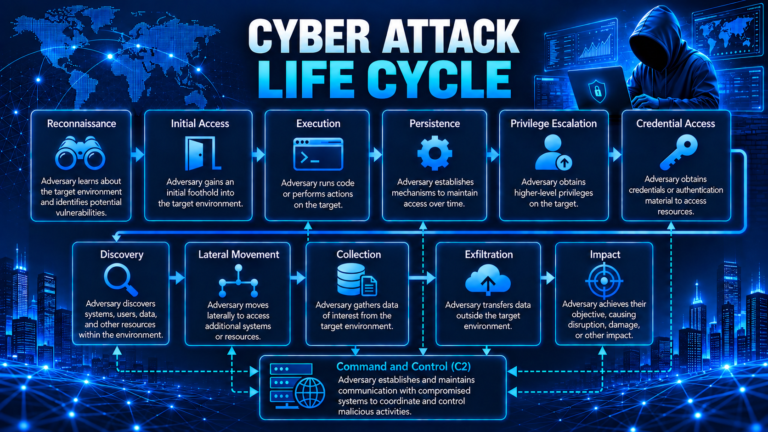
A Cyber Attack Lifecycle describes the different activities an attacker may perform during an attack, from understanding the target and obtaining an initial foothold to expanding access and achieving the intended objective. It provides a structured way to understand how different attacker activities relate to one another throughout a compromise.
The lifecycle is not necessarily a fixed sequence. An attacker may perform multiple activities at the same time, revisit earlier activities, or repeat activities as the attack develops.
The following phases describe the major activities within a cyber attack lifecycle:
Reconnaissance – The attacker gathers information about the target, including users, systems, applications, services, and potential weaknesses.
Initial Access – The attacker obtains an initial foothold in the target environment through a compromised account, vulnerability, exposed service, or another means.
Execution – The attacker executes code, commands, or other actions within the compromised environment.
Persistence – The attacker establishes a means of maintaining access to the target environment over time.
Privilege Escalation – The attacker attempts to obtain privileges beyond those available through the initial access.
Credential Access – The attacker seeks credentials, authentication information, tokens, or other authentication material that may provide access to additional resources.
Discovery – The attacker identifies systems, users, applications, services, data, and other resources within the target environment.
Lateral Movement – The attacker attempts to extend access from the initially compromised system or account to additional systems or resources.
Collection – The attacker gathers information of interest from the target environment.
Command and Control (C2) – The attacker establishes and maintains communication with compromised systems to coordinate and control further activities.
Exfiltration – The attacker transfers collected information outside the target environment when data theft is part of the objective.
Impact – The attacker carries out activities intended to affect systems, information, or business operations, including disruption, manipulation, destruction, or other forms of damage.
These phases provide a framework for understanding attacker activity and do not necessarily represent a rigid sequence. An attacker may perform several activities concurrently, return to an earlier activity, or repeat an activity as the compromise develops.
Where Privilege Escalation Fits in the Cyber Attack Lifecycle
Privilege escalation is the phase in which an attacker attempts to obtain privileges beyond those available through the initial access.
Initial access does not necessarily provide the level of authority required to perform subsequent activities. An attacker may gain access to a system or account but remain restricted from accessing protected resources, modifying system configuration, controlling privileged functions, or performing other actions requiring greater privileges.
The attacker may therefore examine the compromised environment for weaknesses that could provide additional authority. These weaknesses may exist in software, system configuration, access controls, administrative permissions, credentials, or other mechanisms that enforce privilege boundaries.
Privilege escalation may result in access to a more privileged account, process, group, or security context. The additional privileges can then provide access to resources or capabilities that were unavailable through the original foothold.
The specific mechanisms used for privilege escalation vary according to the operating system, applications, architecture, configuration, and security controls of the target environment.
Understanding the cyber attack lifecycle and the position of privilege escalation within it provides the context for understanding Linux privilege escalation.
Linux Fundamentals
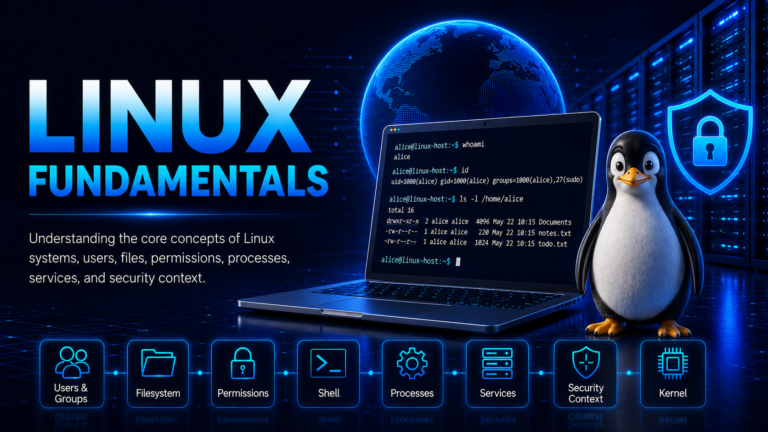
Linux privilege escalation requires an understanding of Linux Fundamentals, including users, groups, privileges, processes, and services. These concepts help establish the security context of the user or process being examined.
Users and Groups
Linux uses users and groups to control access to system resources. Each user has a UID, while groups have GIDs. A user can also belong to supplementary groups that may provide additional access.
During enumeration, identifying the current user and group memberships helps determine what access is already available.
The whoami command displays the current username:
alice@linux:~$ whoami
alice
The groups command displays the groups associated with the current user:
alice@linux:~$ groups
alice sudo
Membership in a privileged group may provide additional access beyond the user’s normal permissions.
Root and Privileged Accounts
root is the traditional Linux superuser and has extensive authority over system resources. Root can generally perform operations that ordinary users cannot, such as modifying protected system files, managing users and groups, controlling services, and changing system configuration.
The traditional root account uses UID 0.
Privilege escalation is not limited to obtaining root. Moving from one user, group, process, or security context to another can also provide additional privileges.
The id command displays the current user’s UID, GID, and group memberships:
alice@linux:~$ id
uid=1000(alice) gid=1000(alice) groups=1000(alice),27(sudo)
Processes and Services
A process is a running instance of a program. Every process operates within a security context that includes user and group identities.
During enumeration, processes can be examined to identify applications and services running with elevated privileges.
alice@linux:~$ ps -eo user,pid,ppid,cmd
USER         PID    PPID CMD
root           1       0 /sbin/init
root         742       1 /usr/sbin/sshd -D
root        1015       1 /usr/sbin/cron -f
alice        2184    2147 -bash
A privileged process becomes particularly relevant when a lower-privileged user can influence its files, configuration, input, environment, or dependencies.
Linux also runs background services and daemons. A service may run as a dedicated service account, an ordinary user, or root, making its identity and configuration relevant during enumeration.
Linux File System
The Linux Filesystem provides a hierarchical structure for storing operating-system files, applications, configuration, user data, logs, libraries, and temporary resources. During privilege-escalation enumeration, understanding the general purpose of important locations helps identify where relevant files and configurations may be found.
Important Filesystem Locations
Some commonly encountered locations include:
/
 /etc
 /home
 /opt
 /tmp
 /usr
 /var
The / directory is the root of the Linux filesystem, with other directories located beneath it.
Several locations are particularly relevant during enumeration:
/etc— system and application configuration./home— user home directories and user-specific data./opt— commonly used for optional or third-party applications./tmp— temporary files and resources./usr— many system programs, libraries, and other resources./var— variable data such as logs, caches, and application data.
The importance of a filesystem location depends on what it contains and who can access or modify those resources.
Files, Directories, and Ownership
Files and directories normally have an associated owner and group, which are used when Linux determines access permissions.
During privilege-escalation enumeration, files and directories can be examined for resources that a lower-privileged user can modify but that are used by privileged users, processes, or services.
This makes filesystem location, ownership, permissions, and how a resource is used important pieces of the overall security context.
Linux Permissions
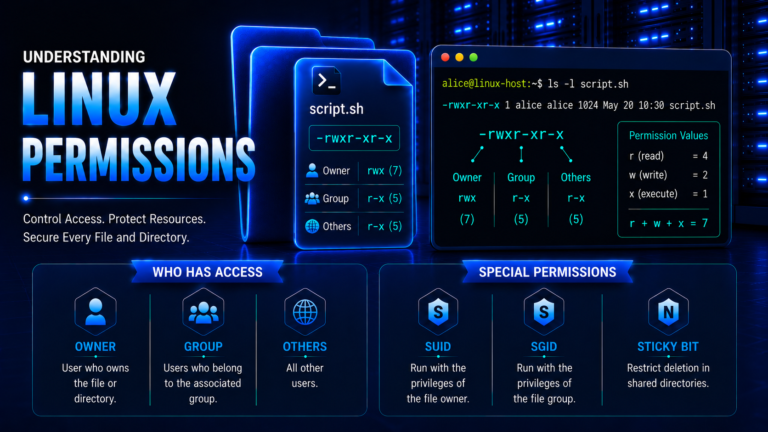
Linux Permissions control access to files, directories, and other system resources. The standard model uses Owner, Group, and Others, with read (r), write (w), and execute (x) permissions assigned to each category.
Owner, Group, and Others
The Owner is the user associated with a resource. The Group is the group associated with it, while Others refers to users who are neither the owner nor members of the associated group.
During enumeration, these categories help determine whether the current user can access or modify a resource.
Read, Write, and Execute
The three fundamental permissions are:
- Read (
r) — allows the contents of a file to be read. For a directory, it allows the names of entries to be viewed. - Write (
w) — allows a file to be modified. For a directory, it allows entries to be created, deleted, or renamed, subject to the applicable permissions. - Execute (
x) — allows an executable file or script to be executed. For a directory, it allows traversal through the directory and access to entries when the required permissions are present.
A permission becomes particularly interesting during privilege-escalation enumeration when a lower-privileged user can modify a resource that is subsequently used by a privileged process or service.
Special Permissions
Linux also provides special permission mechanisms such as SUID, SGID, and the Sticky Bit. These permissions are represented within the existing permission positions rather than creating additional rwx positions.
SUID uses s or S in the Owner execute position:
-rwsr-xr-x
   ↑
  SUID
SGID uses s or S in the Group execute position:
-rwxr-sr-x
     ↑
    SGID
Sticky Bit uses t or T in the Others execute position:
drwxrwxrwt
        ↑
   Sticky Bit
Lowercase s or t indicates that the corresponding execute permission is also set. Uppercase S or T indicates that the special permission is set but the corresponding execute permission is not set.
SUID and SGID can affect the security context associated with executable programs, while SGID can also cause newly created files and directories within a directory to inherit its group ownership.
Linux capabilities provide another mechanism for assigning specific privileged operations without necessarily granting unrestricted root access.
These mechanisms are important when examining files, executables, directories, and processes during privilege-escalation enumeration.
Numeric Permission Values
Linux represents read, write, and execute permissions using numeric values:
| Numeric Value | Permission | Calculation | Meaning |
|---|---|---|---|
0 | --- | 0 | No permissions |
1 | --x | 1 | Execute |
2 | -w- | 2 | Write |
3 | -wx | 2 + 1 | Write, Execute |
4 | r-- | 4 | Read |
5 | r-x | 4 + 1 | Read, Execute |
6 | rw- | 4 + 2 | Read, Write |
7 | rwx | 4 + 2 + 1 | Read, Write, Execute |
For example, the numeric permission 755 consists of three digits representing the permissions for the Owner, Group, and Others, respectively:
755 = rwxr-xr-x

Owner   = 7 = rwx
Group   = 5 = r-x
Others  = 5 = r-x
Understanding numeric permissions is useful during enumeration because permission findings may be represented in either symbolic or numeric form.
Special Permission Values
Special permissions use an additional leading digit in numeric notation:
| Special Permission | Value |
|---|---|
| SUID | 4 |
| SGID | 2 |
| Sticky Bit | 1 |
For example, the numeric permission 4755 consists of the SUID special permission followed by the standard 755 permissions:
4755

4    755
│    │
SUID Standard permissions
Similarly:
2755 → SGID + 755
1755 → Sticky Bit + 755
These values are particularly relevant during privilege-escalation enumeration because SUID and SGID files can provide important findings, while the Sticky Bit is primarily associated with shared writable directories.
Linux Enumeration
Before attempting privilege escalation, a Linux system must first be examined to understand the security context in which the initial access was obtained. This examination, known as Linux Enumeration, is an important activity that occurs before the Privilege Escalation phase.
The purpose of enumeration in this context is not simply to collect information about the system. It is to understand what privileges the current user has, what resources are available, and whether any security weaknesses could provide a path to greater privileges.
Current User and Security Context
The first consideration is the security context of the user who obtained initial access. This includes the username, user ID (UID), primary group, supplementary groups, and privileges already available to the account.
For example:
alice@linux:~$ whoami
alice
The id command provides additional information:
alice@linux:~$ id
uid=1000(alice) gid=1000(alice) groups=1000(alice),27(sudo)
This establishes the starting point from which privilege escalation would be considered. Group membership can also be significant because some groups provide access to resources or administrative functions beyond those normally available to an ordinary user.
Operating System and Kernel
Information about the operating system and kernel helps establish the environment in which the user is operating.
Relevant information includes:
- Linux distribution and version
- Kernel version
- System architecture
- Hostname
- Installed software and packages
- Relevant security updates
For example:
alice@linux:~$ uname -a
Linux linux 6.8.0-40-generic #40-Ubuntu SMP x86_64 GNU/Linux
This information can later be correlated with known security weaknesses, configuration issues, or software-specific privilege-escalation conditions.
Users and Groups
User and group information helps establish who else has accounts on the system and which accounts or groups may possess greater privileges.
Areas of interest include:
- Local user accounts
- Administrative accounts
- Privileged groups
- Service accounts
- Group memberships
- Accounts with unusual privileges
This information can reveal potential differences in privilege between the current account and other accounts on the system.
Sudo Privileges
sudo provides authorized users with the ability to execute specific commands with the privileges of another user, commonly root.
During enumeration, the important consideration is what the current user is authorized to execute and under which security context.
For example:
alice@linux:~$ sudo -lAn unrestricted or unnecessarily broad sudo configuration may represent a potential privilege-escalation condition.
File and Directory Permissions
Filesystem permissions help determine which resources the current user can read, modify, or execute.
Particular attention may be given to:
- Files owned by privileged users
- Writable scripts
- Writable executables
- Writable configuration files
- Writable directories
- Resources used by privileged processes or services
A writable resource becomes particularly significant when it is subsequently used by a process, service, scheduled task, or other operation running with greater privileges.
SUID and SGID Files
Special permissions can cause programs to operate with privileges associated with their owner or group.
SUID allows an executable to operate with the effective privileges of its owner, while SGID can cause an executable to operate with the effective group privileges of its group owner.
During enumeration, these files may therefore warrant further examination, particularly when they are associated with privileged accounts.
Processes and Services
Running processes and services can reveal operations being performed with elevated privileges.
Relevant information includes:
- Process owner
- Executable
- Parent process
- Command-line arguments
- Processes running as
root - Services running with elevated privileges
- Files and dependencies used by privileged processes
A privileged process or service becomes particularly relevant when a lower-privileged user can influence its executable, configuration, dependencies, or other resources.
Scheduled Tasks
Linux systems can automatically execute commands and scripts through mechanisms such as cron and other scheduling facilities.
Enumeration can examine:
- Scheduled jobs
- Cron configuration
- Scripts executed by scheduled tasks
- Ownership of those scripts
- Permissions on associated files and directories
- The user or security context under which the task executes
A scheduled task running with elevated privileges may present a potential escalation condition when its associated resources can be influenced by a lower-privileged user.
Linux Capabilities
Linux capabilities divide certain privileges traditionally associated with root into more granular privileges.
Capabilities assigned to executable files can therefore be relevant during privilege-escalation assessment.
For example:
alice@linux:~$ getcap -r / 2>/dev/nullThe significance of a capability depends on which capability is assigned, which executable receives it, and what operations that executable can perform.
Credentials and Sensitive Information
Enumeration may also identify authentication material stored within files, configurations, applications, or other accessible resources.
Potentially relevant information includes:
- Passwords
- Password hashes
- Private keys
- Authentication tokens
- Application credentials
- Database credentials
- Service credentials
Credentials become particularly significant when they belong to an account with greater privileges than the current user.
Configuration and Environment
Configuration files and environment settings can influence how applications, scripts, and services operate.
Relevant areas include:
- Application configuration
- Service configuration
- Script configuration
- Environment variables
PATH- Configuration files used by privileged processes
- Dependencies and search paths
A configuration becomes relevant to privilege escalation when a lower-privileged user can influence something that is subsequently trusted or executed within a higher-privileged security context.
Software and Kernel Vulnerabilities
The versions of the operating system, kernel, applications, and packages can be compared against known security vulnerabilities.
However, identifying an outdated version does not automatically mean that privilege escalation is possible. The vulnerability must affect the specific component and configuration, and its impact must be relevant to the current security context.
Connecting Enumeration to Privilege Escalation
The purpose of Linux enumeration within this context is to establish relationships between the current user and potentially privileged resources.
For example, enumeration may reveal that:
alicecan modify a file owned byroot.- A privileged service depends on that file.
- A scheduled task executes a writable script with elevated privileges.
- A SUID program provides functionality beyond the user’s normal privileges.
- A privileged account’s credentials are accessible to
alice. - A capability grants an executable additional authority.
These findings provide the information needed to move from Linux Enumeration into the Privilege Escalation phase.
Linux Privilege Escalation Techniques
Once potential weaknesses have been identified through enumeration, the next step is to understand how those weaknesses can result in additional privileges. Linux provides several mechanisms through which a lower-privileged user or process may cross a privilege boundary. These include administrative delegation, special file permissions, writable privileged resources, scheduled tasks, services, capabilities, credentials, and software vulnerabilities.
The presence of a particular mechanism or configuration does not automatically mean that privilege escalation is possible. The security context, ownership, permissions, configuration, and relationship between the affected resource and the privileged operation must be considered together.
Sudo-Based Privilege Escalation
sudo allows an authorized user to execute a command as another user, commonly root, according to a configured security policy. The policy determines which users can execute which commands and under what conditions.
Privilege escalation can occur when a user has been granted more administrative authority through sudo than is necessary for their role. The risk becomes greater when the permitted command can perform additional privileged operations beyond its intended purpose.
For example, a user may be permitted to execute a particular administrative program as root. If that program provides functionality that allows arbitrary commands, files, or other privileged operations to be controlled, the original restriction may no longer provide an effective privilege boundary.
Sudo configurations should therefore be assessed based on:
- Which commands the user can execute.
- Which account the commands can run as.
- Whether command arguments are restricted.
- Whether the permitted program can access other privileged functionality.
- Whether the command or its associated files can be modified by the user.
SUID-Based Privilege Escalation
SUID (Set User ID) changes the effective user identity associated with an executable when it is executed. When a SUID executable is owned by root, it can execute with the effective privileges of root, subject to the program’s behavior and the system’s security controls.
This mechanism is legitimate and is used by some Linux programs that require specific elevated operations. However, an insecure, vulnerable, or unnecessarily privileged SUID program can create a privilege-escalation opportunity.
The important relationship is:
Lower-privileged user → SUID executable → privileged execution context
The presence of SUID alone does not establish a vulnerability. The executable’s purpose, ownership, permissions, implementation, and behavior must be assessed.
SGID-Based Privilege Escalation
SGID (Set Group ID) can cause an executable to operate with the effective group privileges associated with its group owner.
An SGID program can therefore provide access to group-controlled resources that would not normally be available to the executing user.
As with SUID, the security significance depends on the program and the privileges associated with its group.
SGID can also apply to directories, where it affects group inheritance for newly created files and directories. This can become relevant when examining shared directories and resources used by privileged applications.
Writable File and Directory-Based Privilege Escalation
File and directory permissions can create privilege-escalation opportunities when a lower-privileged user can modify a resource that is subsequently used within a more privileged security context.
Examples include:
- A privileged script that is writable by an unprivileged user.
- A configuration file used by a privileged service that can be modified.
- A directory used by a privileged process that allows unauthorized modification.
- An executable owned by a privileged account that can be altered by another user.
The key issue is not simply write permission. The resource must have a meaningful relationship with a privileged process, service, account, or operation.
Scheduled Task-Based Privilege Escalation
Linux systems can execute commands and scripts automatically through scheduling mechanisms such as Cron Jobs, Anacron, and systemd timers.
Scheduled tasks can become a privilege-escalation concern when they execute with elevated privileges and depend on a resource that a lower-privileged user can influence.
For example, a privileged scheduled task may execute a script owned by root. If that script is writable by an unprivileged user, the separation between the user’s privileges and the privileges of the scheduled task may be weakened.
A scheduled task does not inherently represent a privilege-escalation vulnerability. The risk arises when elevated execution is combined with inadequate protection of the resources or configuration that control what gets executed.
Service-Based Privilege Escalation
Linux services and daemons often operate continuously in the background and may run with elevated privileges.
A service can become a privilege-escalation opportunity when a lower-privileged user can influence the service’s executable, configuration, dependencies, startup resources, or other files used during execution.
The relevant relationship is:
Privileged service → dependent resource → lower-privileged control
A service running as root is therefore not automatically vulnerable. Its configuration and dependencies must be examined to determine whether the privilege boundary can actually be influenced.
Linux Capability-Based Privilege Escalation
Linux capabilities divide many privileges traditionally associated with root into more granular units that can be independently assigned to processes.
This allows a program to receive a specific privileged capability without receiving unrestricted root privileges.
For example, capabilities can provide privileges associated with operations such as changing process identities, performing certain network operations, or carrying out specific system-administration functions.
A capability can become relevant to privilege escalation when it is assigned to an executable that a lower-privileged user can execute or influence.
The security significance therefore depends on:
- Which capability is assigned.
- Which executable receives it.
- What the executable does.
- Which user executes it.
- Whether the capability provides meaningful additional authority.
Credential-Based Privilege Escalation
Credentials can provide another route to additional privileges. During enumeration, credentials may be discovered in configuration files, application data, scripts, user files, environment variables, or other accessible resources.
Potentially relevant information includes:
- Passwords.
- Password hashes.
- Private keys.
- Authentication tokens.
- Application credentials.
- Database credentials.
- Service credentials.
If credentials belong to a more privileged account, they may allow the user to transition into that account’s security context.
However, the presence of credentials alone does not establish privilege escalation. Their validity, ownership, intended use, and associated privileges must be considered.
Software and Kernel-Based Privilege Escalation
Vulnerabilities in applications, packages, or the Linux kernel can sometimes allow a lower-privileged process to perform operations beyond its assigned privileges.
These vulnerabilities may result from flaws in areas such as:
- Memory management.
- Input validation.
- Access-control enforcement.
- Privileged process handling.
- Application logic.
- Kernel functionality.
A vulnerable version number by itself does not establish that privilege escalation is possible. The vulnerability must affect the specific component and configuration, and its security impact must be relevant to the current privilege level.
Environment and Configuration-Based Privilege Escalation
Environment variables and configuration settings can influence how programs and services locate files, load components, process input, and execute other resources.
Configuration weaknesses can become relevant when a privileged process trusts values or resources that a lower-privileged user can influence.
Areas that may require assessment include:
PATHconfiguration.- Application configuration.
- Service configuration.
- Script configuration.
- Environment variables.
- Configuration files used by privileged processes.
- Search paths and dependencies.
The security impact depends on whether the configuration allows the lower-privileged user to influence an operation performed with greater privileges.
Common Linux Privilege Escalation Conditions
The mechanisms described above generally become security concerns when specific weaknesses or misconfigurations exist. Common conditions include excessive administrative permissions, insecure special permissions, writable privileged resources, vulnerable software, exposed credentials, and weak service or scheduled-task configurations.
Excessive Sudo Privileges
Users may be granted administrative permissions that exceed their operational requirements. Broad or poorly restricted sudo rules can weaken the intended separation between ordinary and administrative users. The sudo documentation specifically warns against granting sudo access to files that users can modify or replace.
Insecure SUID and SGID Programs
SUID and SGID programs can provide elevated execution contexts by design. An unnecessary, vulnerable, incorrectly owned, or improperly controlled program can therefore create an unintended privilege boundary.
Writable Privileged Resources
A lower-privileged user having write access to a resource used by a privileged process, service, or scheduled task can create an escalation condition.
The critical factor is the relationship between the writable resource and the privileged operation.
Misconfigured Scheduled Tasks
Scheduled tasks become security concerns when they execute with elevated privileges while depending on files, scripts, directories, or configurations that can be influenced by a lower-privileged user.
Vulnerable or Misconfigured Services
A service running with elevated privileges may expose a privilege boundary if its executable, configuration, dependencies, or other operational resources can be controlled by a lower-privileged user.
Dangerous Linux Capabilities
Capabilities can provide specific privileged operations without granting full root privileges. A capability assigned to an inappropriate executable or application can therefore create an unintended privilege boundary.
Exposed Privileged Credentials
Credentials associated with administrative or otherwise privileged accounts can allow a user to transition into a higher-privileged security context.
Vulnerable Software and Kernel Components
Security vulnerabilities in privileged applications, services, packages, or kernel components can sometimes allow a lower-privileged process to obtain additional privileges.
Weak Privileged Process Dependencies
A privileged process may depend on scripts, executables, libraries, configuration files, directories, or other resources.
If a lower-privileged user can influence one of those dependencies, the privileged process may become an escalation path.
The security boundary is therefore determined not only by who runs the process, but also by what the process trusts and what other users can control.
Conclusion
Linux privilege escalation occurs when a user or process obtains privileges beyond those assigned to its original security context. The Linux security model provides several mechanisms for enforcing privilege boundaries, but weaknesses in their configuration or implementation can create opportunities to cross those boundaries.
Understanding privilege escalation requires connecting the current security context with the resources and mechanisms that can provide greater authority. Enumeration helps identify these resources, while assessment determines whether they represent meaningful escalation conditions.
Common Linux privilege-escalation mechanisms include sudo, SUID, SGID, writable privileged resources, scheduled tasks, services, Linux capabilities, credentials, vulnerable software, kernel vulnerabilities, and configuration weaknesses.
The presence of one of these mechanisms does not automatically indicate a vulnerability. Privilege escalation depends on the specific relationship between the user, resource, process, configuration, and privileges involved.
References
Linux man-pages – sudo(8) — execute a command as another user
Provides the authoritative Linux manual-page reference for sudo, including its purpose, security policy, execution context, and security considerations.
Linux man-pages – sudoers(5) — sudo security policy
Documents the sudoers security policy and the rules that determine which commands users are permitted to execute with elevated privileges.
Linux man-pages – capabilities(7) — overview of Linux capabilities
Explains how Linux divides traditional superuser privileges into individual capabilities and how those capabilities are applied to processes and executable files.
Linux Kernel Documentation – No New Privileges Flag
Explains the Linux no_new_privs mechanism and how it prevents execve() from granting privileges that were not already available to the calling process.
MITRE – Abuse Elevation Control Mechanism: Setuid and Setgid
Documents the abuse of Setuid and Setgid mechanisms as a privilege-escalation technique in Linux and other supported environments.