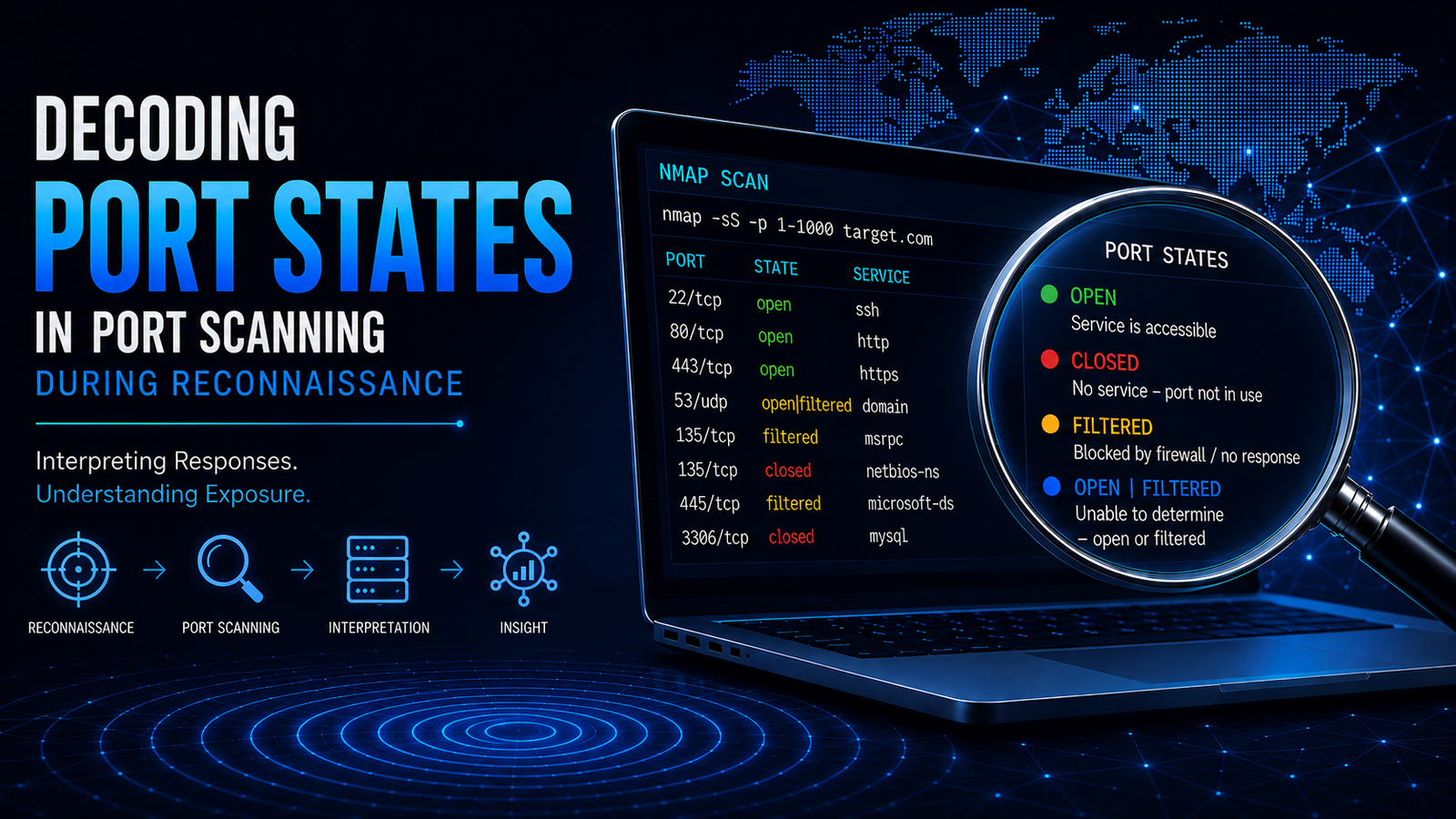
Decoding Port States in Port Scanning During Reconnaissance
Introduction
Port scanning is a fundamental network reconnaissance technique used to identify accessible network ports and understand how those ports respond to network probes.
A networked system can provide different services through different ports. By sending network probes and analyzing the responses, a scanner can determine how a target responds to connection attempts and classify the observed state of a port.
Port scanning is an important reconnaissance activity because it helps build an understanding of a target’s network exposure. It can reveal which ports are accessible, which appear to have services listening, and which may be affected by network filtering or firewall controls.
Port scanning is used in both offensive and defensive security contexts. Security professionals use it to assess exposed services, validate network controls, and understand attack surface, while attackers may use similar techniques to identify potential points of entry.
However, a port scan does not by itself establish that a vulnerability exists. It primarily provides information about network reachability and port behavior. Correctly interpreting scan results requires an understanding of TCP and UDP communication, network responses, ICMP messages, and the influence of firewalls.
Reconnaissance Phase in the Cyber Attack Lifecycle
A cyber attack lifecycle describes the broad stages through which an attack may progress, from gathering information about a target to attempting exploitation and achieving an objective. Reconnaissance is an early stage in this lifecycle and provides information that may support subsequent attack activities.
Reconnaissance is the information-gathering phase of a cyber attack lifecycle. It focuses on collecting information about a target before subsequent attack activities are attempted.
The information gathered during reconnaissance can help establish an understanding of the target’s infrastructure, systems, network services, technologies, and potential attack surface.
Reconnaissance activities can be broadly grouped into the following areas:
- Footprinting – Gathering information about the target and its externally visible infrastructure.
- Scanning – Probing systems and networks to identify reachable hosts, ports, protocols, and services.
- Enumeration – Collecting more detailed information about identified systems, services, and resources.
- Vulnerability Analysis – Examining discovered systems and services for potential security weaknesses.
These activities provide progressively more detailed information about the target environment. Port scanning falls within the scanning activity and focuses specifically on determining which network ports are accessible and how a target responds to network probes.
Role of Port Scanning in Reconnaissance
Port scanning is an important activity within the scanning stage of reconnaissance. It focuses on identifying accessible network ports on a target system and determining how those ports respond to network probes.
Reconnaissance can be broadly divided into passive reconnaissance and active reconnaissance. Port scanning belongs to active reconnaissance because it requires direct interaction with the target or its network infrastructure.
Passive Reconnaissance
Passive reconnaissance involves collecting information about a target without directly sending probes to its systems or network infrastructure.
Common passive reconnaissance activities include:
- Search Engine Research – Finding publicly available information about the target through search engines.
- Domain and DNS Research – Gathering publicly available domain, DNS, and IP address information.
- WHOIS and Registration Research – Examining publicly available domain and registration information.
- Certificate Research – Reviewing publicly available certificate information to identify domains and related infrastructure.
- Public Document Analysis – Examining publicly available documents for information about technologies, systems, or organizational infrastructure.
- Public Code and Repository Research – Reviewing publicly available source code and repositories for information related to the target.
- Social Media and Public Profile Research – Gathering information from publicly available organizational and individual profiles.
Passive reconnaissance generally produces little or no direct network interaction with the target infrastructure.
Active Reconnaissance
Active reconnaissance involves directly interacting with the target or its network infrastructure to gather information.
Common active reconnaissance activities include:
- Host Discovery – Determining which systems or hosts are reachable.
- Network Scanning – Probing network infrastructure to identify reachable systems and network characteristics.
- Port Scanning – Probing network ports to determine their accessibility and observed state.
- Service Identification – Determining which services may be associated with accessible ports.
- Service and Version Detection – Gathering information about the services and versions exposed by a system.
- Enumeration – Collecting more detailed information about identified systems, services, and resources.
- Vulnerability Analysis – Examining identified systems and services for potential security weaknesses.
Because active reconnaissance generates traffic toward the target, these activities may be visible to firewalls, intrusion detection systems, intrusion prevention systems, and other security monitoring controls.
Types of Port Scanning
Port scanning can be performed using different techniques depending on the protocol and the way network probes are constructed.
TCP Port Scanning
TCP port scanning examines TCP ports by sending TCP probes and analyzing the responses from the target.
Common TCP scanning techniques include:
- TCP Connect Scan – Attempts to establish a complete TCP connection with the target port.
- SYN Scan – Sends a TCP SYN probe and analyzes the response without completing the normal TCP connection.
- ACK Scan – Uses TCP ACK probes primarily to determine whether ports are filtered or unfiltered.
- FIN Scan – Sends TCP FIN probes and analyzes the response.
- NULL Scan – Sends a TCP packet without TCP flags and analyzes the response.
- Xmas Scan – Sends a TCP packet with multiple TCP flags set and analyzes the response.
UDP Port Scanning
UDP port scanning examines UDP ports by sending UDP probes and analyzing application responses, ICMP messages, or the absence of a response.
UDP scanning is generally more difficult to interpret than TCP scanning because UDP does not use a connection establishment handshake. A lack of response does not necessarily mean that a port is closed. It may indicate that the port is open but did not respond, or that traffic is being filtered.
What Are Ports?
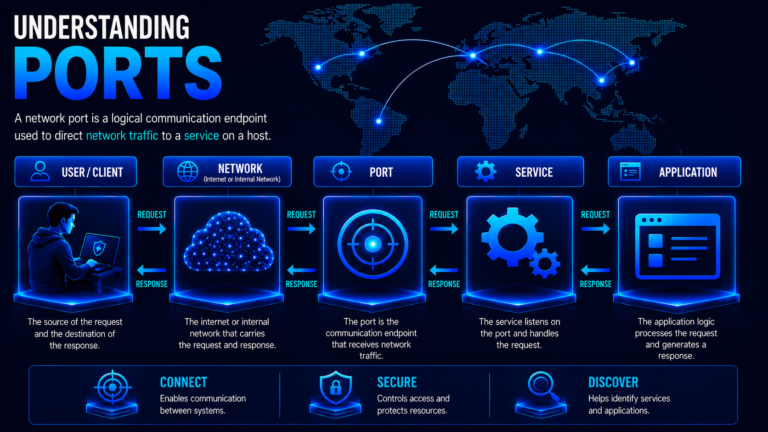
A port is a logical communication endpoint identified by a number and used with a transport protocol such as TCP or UDP. Ports allow multiple network services and applications to communicate through the same network interface using different communication endpoints.
A network service is a function provided over a network, such as web access, DNS resolution, email, or remote administration. An application or server process typically provides that service and listens on one or more ports for incoming network communication.
An application is a software program that performs a specific function for users or other systems. In a networked environment, an application may communicate over a network by using a network service and one or more transport-layer ports. For example, a web server application provides web content to clients through services such as HTTP or HTTPS.
For example, a web server application may provide an HTTP service that commonly listens on TCP port 80, while HTTPS commonly uses TCP port 443. The port number identifies the communication endpoint, while the service and application provide the functionality available through that endpoint.
Port numbers are generally categorized into three ranges:
- Well-known ports (0-1023) – Commonly associated with widely used network services and protocols.
- Registered ports (1024-49151) – Used by applications and services that have registered specific port numbers.
- Dynamic or private ports (49152-65535) – Commonly used for temporary or dynamically assigned communication endpoints.
Understanding ports, network services, and applications provides the foundation for interpreting what happens when a port is scanned and how the resulting responses are classified into different port states.
Why Port-State Decoding Matters in Port Scanning
Port scanning involves sending network probes to a target and analyzing how the target responds to those probes. The responses provide information about how the port behaves from the scanner’s perspective.
A port may appear open, closed, filtered, or ambiguous depending on the response received and the scanning technique used. Correctly interpreting these states is important because the same port can produce different results under different network conditions.
Port-state decoding helps security professionals understand:
- Whether a service appears to be accessible – An open port generally indicates that something on the target is accepting network connections on that port.
- Whether a service appears to be unavailable – A closed port indicates that the target is reachable, but no service is currently accepting connections on that port.
- Whether filtering may be affecting the result – A filtered state indicates that network controls may be preventing the scanner from determining whether a service is listening.
- Whether the result is ambiguous – States such as open|filtered indicate that the available response is insufficient to distinguish between possible conditions.
- How the target responds to different scanning techniques – Different scan types can produce different observations for the same port.
An open port can therefore provide an indication that a network service is listening and potentially accessible, but the port state alone does not identify the specific service or application. Additional service identification techniques may be required to determine what is running behind the port.
Similarly, a closed port does not necessarily mean that the application or system itself is unavailable. It indicates that no service is accepting connections through that particular port at the time of the scan.
Factors That Affect Port-State Decoding
Port-state results are influenced not only by the target system but also by the network path and security controls that affect communication between the scanner and the target.
Important factors include:
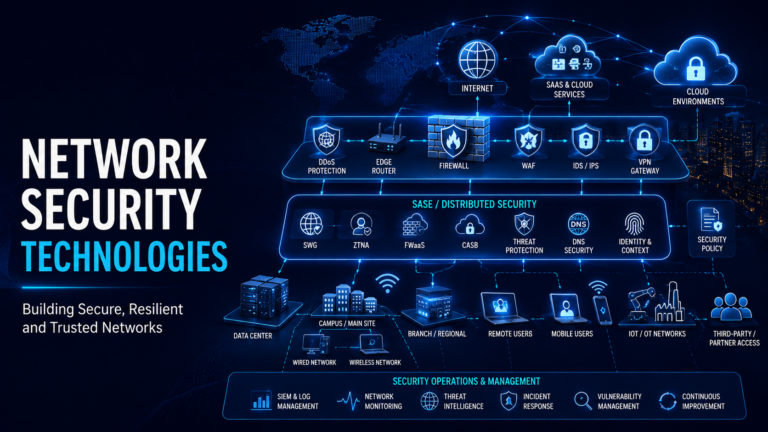
- Network firewall – A firewall positioned between the scanner and the target may allow, reject, or silently drop probes based on source, destination, protocol, port, or other rules.
- Host-based firewall – A firewall running directly on the target system may control incoming traffic and produce different responses for different ports or connection sources.
- Intrusion Prevention System (IPS) – An IPS may detect scanning activity and block, reset, or otherwise interfere with probes, affecting the observed response.
- Network Address Translation (NAT) – NAT devices can change how traffic reaches the target and may influence which ports are exposed or how responses are returned.
- Access Control Lists (ACLs) – Network devices may use ACLs to permit or deny specific types of traffic, affecting scan results.
- Routing and network path – Intermediate routers, filtering devices, or other network controls can prevent probes or responses from reaching their destination.
- Service configuration – A service may listen only on specific interfaces, addresses, or protocols, causing a port to appear differently depending on where the scan originates.
- Rate limiting and traffic controls – Systems and security devices may limit or suppress responses to repeated probes, making results less predictable.
- Network security policies – Organizational security controls may intentionally restrict or alter responses to reconnaissance traffic.
These factors mean that a port state should not automatically be interpreted as an absolute statement about what is running on the target. For example, a filtered result may indicate that a firewall is blocking the probe, but it does not by itself prove which security device caused the filtering or whether a service is actually listening behind it.
Port-state decoding should therefore be understood as the interpretation of observed network behavior under specific scanning and network conditions. This distinction becomes important when moving from basic port-state identification to the detailed decoding of TCP and UDP scan responses.
Understanding Port States
A port state describes how a target system responds when a scanner sends a probe to a particular port. The state is determined by analyzing the response, or lack of response, observed by the scanner.
Port states describe the observed network behavior of a port during a particular scan. They do not directly identify the application or service running on the system. An open state may indicate that a service is accepting connections, while a filtered or ambiguous state may indicate that network controls or protocol behavior prevent a definitive conclusion.
The commonly encountered port states are:
| Port State | Meaning |
|---|---|
| Open | A service appears to be listening on the port and accepting the type of connection or probe being tested. |
| Closed | The port is reachable, but no service is listening on the port. |
| Filtered | Filtering prevents the scanner from determining whether the port is open or closed. |
| Unfiltered | The port is reachable, but the particular scan cannot determine whether it is open or closed. |
| Open|Filtered | The scanner cannot determine whether the port is open or filtered. |
| Closed|Filtered | The scanner cannot determine whether the port is closed or filtered. |
Open
An open port indicates that a service appears to be listening and accepting the type of network communication being tested. For example, during a TCP SYN scan, a SYN/ACK response generally indicates that the port is open.
An open state provides useful information about the target’s exposed network surface, but it does not by itself identify the exact service, application, or software version associated with the port.
Closed
A closed port indicates that the target is reachable, but no service is accepting connections or responding on that port for the protocol being tested. During a TCP SYN scan, a TCP RST response generally indicates that the port is closed.
A closed port is therefore different from an unreachable port. The scanner has received a response indicating that the target can be reached, but there is no listening service at that particular port.
Filtered
A filtered port is one where filtering prevents the scanner from determining whether the port is open or closed. A firewall or another network security control may silently drop the probe or return an indication that the traffic is prohibited.
The scanner therefore cannot obtain enough information to determine the actual state of the port.
Unfiltered
An unfiltered port is reachable, but the scanning technique being used cannot determine whether the port is open or closed. This state is particularly associated with techniques such as an ACK scan.
A response can show that the probe reached the target and was not blocked by filtering, but it does not establish whether an application is listening on the port.
Ambiguous States
Two states indicate that the scanner cannot distinguish between possible conditions:
- Open|Filtered – The scanner cannot determine whether the port is open or filtered. This commonly occurs when a scan receives no response and the scanning technique cannot distinguish between an active service and silently filtered traffic. UDP scanning commonly produces this result.
- Closed|Filtered – The scanner cannot determine whether the port is closed or filtered. This result is associated with specific scanning techniques where the available response cannot distinguish between the two conditions.
Port States Are Dependent on Scanning Conditions
A port does not necessarily produce the same observable state under every scanning technique. The result can be influenced by the transport protocol, scan type, target behavior, network firewall, host-based firewall, intrusion prevention systems, access control lists, routing, filtering policies, and other network conditions.
Therefore, a port state should be understood as an observation made under specific scanning conditions, rather than an absolute statement about the target system.
For example, an open result indicates that the scanner observed behavior consistent with a service accepting the tested communication. It does not prove which application is providing the service. Similarly, a filtered result does not prove that no service is running; it means that the scanner could not determine the state because filtering or other conditions prevented a definitive observation.
TCP Port-State Decoding
TCP port-state decoding involves analyzing the responses generated when TCP probes are sent to a target port. Because TCP is connection-oriented, its response behavior provides useful information for determining whether a port appears to be open, closed, or affected by filtering.
A normal TCP connection begins with a three-way handshake. The client sends a SYN packet, the server responds with SYN/ACK, and the client completes the connection with an ACK. Port-scanning techniques use variations of this behavior to determine how the target responds without necessarily establishing a complete application session.
TCP Responses and Port States
The most important TCP responses used during port-state interpretation include:
| TCP Response | Typical Interpretation |
|---|---|
| SYN/ACK | Indicates that the port is open and a service appears to be accepting TCP connections. |
| RST | Typically indicates that the port is closed during connection-establishment scans. |
| No response | May indicate filtering or an ambiguous state, depending on the scan technique. |
| ICMP error | May indicate that traffic is being filtered, depending on the type of ICMP message and scanning technique. |
The meaning of a response depends on the type of TCP scan being performed. A SYN/ACK has a different significance from an RST in most TCP scans, while an RST received during an ACK scan is primarily evidence that the port is unfiltered, not that it is closed.
TCP Connect Scan
A TCP Connect scan attempts to establish a complete TCP connection with the target port.
- Connection established – The port is considered open.
- RST received – The port is considered closed.
- No response or filtering-related response – The port may be considered filtered.
Because this scan completes the TCP connection when a service accepts it, it can generate more noticeable connection activity than techniques that do not complete the handshake.
SYN Scan
A SYN scan sends a TCP SYN probe and analyzes the response without completing the normal TCP connection.
- SYN/ACK received – The port is open.
- RST received – The port is closed.
- No response or certain ICMP errors – The port is generally considered filtered.
SYN scanning is widely used because it can determine port states without completing the full TCP connection to the application.
ACK Scan
An ACK scan sends TCP ACK probes and is primarily used to determine whether a port is filtered or unfiltered.
- RST received – The port is considered unfiltered.
- No response or certain ICMP errors – The port is considered filtered.
An ACK scan does not determine whether a service is listening. An unfiltered result therefore does not mean that the port is open.
FIN Scan
A FIN scan sends a TCP packet with the FIN flag set rather than initiating a normal connection.
For systems that follow the expected TCP behavior:
- RST received – The port is considered closed.
- No response – The port may be open|filtered.
- Certain ICMP errors – The port may be filtered.
The interpretation can vary because operating systems and network security devices do not always respond identically to unusual TCP packets.
NULL Scan
A NULL scan sends a TCP packet with no TCP flags set.
Under expected TCP behavior:
- RST received – The port is considered closed.
- No response – The port may be open|filtered.
- Certain ICMP errors – The port may be filtered.
Like FIN scanning, NULL scanning relies on differences in TCP response behavior rather than establishing a normal connection.
Xmas Scan
An Xmas scan sends a TCP packet with multiple TCP flags set, commonly FIN, PSH, and URG.
Under expected TCP behavior:
- RST received – The port is considered closed.
- No response – The port may be open|filtered.
- Certain ICMP errors – The port may be filtered.
The results of FIN, NULL, and Xmas scans should be interpreted carefully because some operating systems and security devices may respond differently from the expected TCP behavior.
TCP Scan Interpretation
The same target can produce different port-state results depending on the TCP scan technique used. Therefore, the response must always be interpreted in the context of the scan type, TCP behavior, target operating system, and network security controls.
An important distinction is that TCP responses provide evidence about port behavior, not necessarily the identity of the application or service. An open result indicates that something is accepting TCP connections on the tested port, while identifying the specific service requires additional service identification techniques.
UDP Port-State Decoding
UDP port-state decoding involves analyzing the responses generated when UDP probes are sent to a target port. Because UDP is connectionless and does not use a three-way handshake, its response behavior is different from TCP and can make port-state determination more ambiguous.
A UDP scanner sends a probe to the target port and analyzes any application response, ICMP message, or absence of a response. Unlike TCP, an open UDP service does not have to send a response to indicate that it is available.
UDP Responses and Port States
The most important UDP responses used during port-state interpretation include:
| UDP Response | Typical Interpretation |
|---|---|
| UDP application response | Indicates that the port is open and an application appears to be responding to the probe. |
| ICMP Port Unreachable | Indicates that the port is closed and no application is listening on the destination port. |
| No response | May indicate an open or filtered port, resulting in an open|filtered state. |
| ICMP filtering or administratively prohibited message | May indicate that traffic is being filtered, resulting in a filtered state. |
The meaning of a response depends on the type of UDP scan being performed, the protocol being tested, the behavior of the application, and the network security controls affecting the traffic. In particular, the absence of a response cannot by itself confirm that a UDP port is open because the probe may also have been silently filtered.
Open
A UDP port can be classified as open when the application or service responds to the probe.
The response indicates that an application is actively processing the received UDP traffic. The exact response depends on the protocol and service running on the port.
An open UDP port therefore provides evidence that a service is accessible through that port, although the port state alone does not identify the specific application or service.
Closed
A UDP port is generally classified as closed when the target returns an ICMP Port Unreachable message indicating that no application is listening on the destination port.
Unlike TCP, there is no UDP connection rejection equivalent to a TCP RST. ICMP therefore provides an important source of information when interpreting UDP scan results.
Open|Filtered
A UDP port is commonly classified as open|filtered when the scanner receives no response.
The absence of a response creates an ambiguity. The port may be open but the application may not respond to the probe, or a firewall or other filtering control may have silently dropped the probe.
Therefore, no response does not mean that a UDP port is open. It means that the scanner cannot distinguish between an open port and a filtered port based on the available evidence.
Filtered
A UDP port may be classified as filtered when the scanner receives an ICMP message indicating that traffic is administratively prohibited or otherwise blocked by a filtering mechanism.
This indicates that network controls are interfering with the probe and preventing the scanner from determining whether an application is listening on the port.
UDP Scan Interpretation
The same target can produce different port-state results depending on the UDP scan technique used. Therefore, the response must always be interpreted in the context of the scan type, UDP behavior, target application, and network security controls.
An important distinction is that UDP responses provide evidence about port behavior, not necessarily the identity of the application or service. An open result indicates that an application appears to be responding to UDP traffic on the tested port, while identifying the specific service requires additional service identification techniques.
Why UDP States Are More Ambiguous
UDP scanning is generally more difficult to interpret than TCP scanning because there is no connection establishment process and many UDP applications do not respond to unexpected or malformed probes.
As a result, the absence of a response provides limited information. The scanner must consider the protocol being tested, expected application behavior, ICMP responses, and possible filtering when determining the observed state.
The interpretation of UDP port states should therefore be treated as an assessment of observable network behavior under the conditions of the scan, rather than definitive proof of whether a service exists behind the port.
Role of ICMP, Firewalls, and Network Controls
Port-state decoding is influenced by more than the target’s TCP or UDP behavior. Network devices, host security controls, and filtering policies can modify, block, or suppress the responses that a scanner relies on to determine a port state.
Role of ICMP
Internet Control Message Protocol (ICMP) provides network-level error and diagnostic information that can help scanners interpret port behavior.
For example:
- ICMP Port Unreachable can indicate that a UDP port is closed.
- ICMP Administratively Prohibited can indicate that traffic is being blocked by a filtering control.
- Other ICMP unreachable messages can provide information about network reachability or filtering.
The meaning of an ICMP response depends on the specific ICMP message, transport protocol, scan technique, and network environment.
Network Firewalls
A network firewall positioned between the scanner and target can control whether scan probes are permitted to reach the target and whether responses are allowed to return.
A firewall may:
- Allow probes and responses
- Reject traffic with an explicit response
- Silently drop probes
- Apply different rules based on source, destination, protocol, or port
- Rate-limit or otherwise restrict repeated traffic
These behaviors can significantly affect the port state observed by the scanner.
Host-Based Firewalls
A host-based firewall operates on the target system and can control incoming network traffic before it reaches applications or services.
It may allow connections to some ports while blocking others. As a result, a service may be running on a port but appear filtered when viewed from a particular network location.
Intrusion Prevention and Other Security Controls
Security controls such as Intrusion Prevention Systems (IPS), network access controls, and other traffic inspection mechanisms can detect scanning patterns and take action against them.
Depending on their configuration, these controls may:
- Drop scan probes
- Reject connections
- Reset connections
- Temporarily block the scanner’s source address
- Rate-limit scanning traffic
- Modify or suppress responses
Such behavior can influence the state reported by a scanner.
Routing and Network Path
The network path between the scanner and target can also affect scan results. Routers, access control lists, NAT devices, security gateways, and other intermediate systems may control or modify traffic.
Consequently, a port state represents what the scanner can observe from its position in the network. It does not necessarily represent the internal state of the target in isolation.
Interpreting Security-Control Effects
A filtered result should therefore not automatically be interpreted as evidence that no service is running. Similarly, an absence of a response does not necessarily indicate that a port is closed.
Correct interpretation requires considering the transport protocol, scan technique, target behavior, ICMP responses, network firewalls, host-based firewalls, intermediate security controls, and network path together.
Interpreting Port-Scanning Results
Port-scanning results should be interpreted as observations of how a target and its surrounding network controls responded to a particular scan. A reported port state does not necessarily represent the absolute condition of the underlying system.
Consider a simplified scan result:
PORT      STATE          SERVICE
22/tcp    open           ssh
80/tcp    filtered       http
443/tcp   closed         https
161/udp   open|filtered  snmp
The results can be interpreted as follows:
- 22/tcp open – The scanner received a response consistent with a service accepting TCP connections on port 22. The
SERVICEfield suggests SSH, but the port state itself does not prove that a specific SSH implementation is running. - 80/tcp filtered – The scanner could not determine whether port 80 is open or closed because filtering or another network condition prevented a definitive response.
- 443/tcp closed – The target is reachable on TCP port 443, but no service is accepting connections on that port.
- 161/udp open|filtered – The scanner could not distinguish between an open UDP service and a filtered port because the available response was insufficient.
Port State and Service Identification
The STATE and SERVICE information in a scan result represent different concepts.
The port state describes the observed behavior of the port, while service identification attempts to determine what service or application is associated with that port.
A port commonly associated with a particular service does not guarantee that the service is actually running there. Services can be configured to use different port numbers, and multiple applications can use the same port under different conditions.
Therefore, service identification should be treated as additional information rather than as a direct interpretation of the port state.
Interpreting Results in Context
A scan result should be evaluated together with:
- The transport protocol being scanned
- The scanning technique used
- The response received
- Firewall and filtering behavior
- Host-based security controls
- Network topology and routing
- Target operating system behavior
- Service configuration
This context is especially important for ambiguous states such as open|filtered and closed|filtered, where the available evidence does not allow the scanner to make a definitive determination.
Ultimately, port scanning provides a view of the target’s observable network exposure from the scanner’s location. Accurate interpretation requires understanding both the protocol behavior and the network controls that can influence what the scanner observes.
Conclusion
Port scanning provides an important view of a target’s network exposure during active reconnaissance. By sending probes and analyzing the resulting responses, security professionals can determine how accessible ports behave under specific network conditions.
Understanding port states such as open, closed, filtered, unfiltered, open|filtered, and closed|filtered is essential for interpreting these results correctly. TCP and UDP use different communication behaviors, so their scan results must be evaluated using different response patterns.
Port-state decoding also requires consideration of the wider network environment. Firewalls, host-based security controls, IPS, ACLs, routing, and other filtering mechanisms can influence what a scanner observes.
An open port can indicate that a network service is accessible, but the port state alone does not identify the specific application or service. Port-state information should therefore be treated as observed network behavior, providing a foundation for understanding exposure and supporting further security analysis during reconnaissance.
References
Nmap – Port Scanning Basics
Explains the six port states recognized by Nmap and how they represent the scanner’s observations of target behavior.
Nmap – Port Scanning Techniques and Algorithms
Documents TCP SYN, TCP Connect, UDP, ACK, FIN, NULL, and Xmas scanning techniques and their response interpretation.
Nmap – UDP Scan
Explains how UDP responses, ICMP messages, and lack of response are used to determine UDP port states.