
Domain Name Service (DNS) provides naming service for computers and services. It has a database of mappings of hostnames to IP addresses. Client which wants to access target services on a server, connects to the hostnames. To resolve the hostname, the client send requests to the DNS server and gets the IP address. Using the IP address, the client accesses the service.
Earlier before DNS, hostnames were names given to computers connected to a LAN. These hostnames uniquely identify each machines connected on the network. The IP address assigned to a machine is difficult to remember as it’s a numeric value and also in LAN, IP addresses are assigned dynamically from DHCP server and hence the IP addresses keep changing. Hostnames makes the management and accessing of the machines connected on the LAN easy. The hostname are permanent unique names given to the machines. NetBIOS was the networking protocol that was used to by machines to connect to each other and share data. The hostnames were resolved to the respective machine’s IP address using a Name Server which has the mapping of all the hostnames names and IP addresses of the machines connected to the network. NetBIOS was replaced by DNS.
Internet Hostnames are names given to machines that are connected to the Internet which is a public network. Every machine connected to the Internet should have an unique public IP address and public hostname. In the 1980s, the Internet was booming up and along with it, World Wide Web (WWW) was exponentially evolving for data sharing. There was a need for simple human readable names for accessing systems sharing information. In 1984, Domain Name Server (DNS) was introduced by researchers to address this issue.
Initially, flat names were used for Internet Hostnames. Network Information Center (NIC) which was an organization that responsible for managing the Internet Hostnames. Flat Hostnames were simple to manage but as Internet grew, more hostnames were required. Managing unique flat hostnames across Internet was challenging.
To address the limitation of flat hostnames, hierarchical naming model evolved. The hierarchical naming model had top level names. These top-level names were delegated to sub authorities below, who partitioned the top-level names to sub-names and gave it to organization to uniquely identify themselves on the Internet. The Domain Name becomes the organization’s identity in the Internet.
In 1984, DNS (Domain Naming Service) was developed by researchers for naming service for the Internet. The DNS has two important principles. First principle defines the syntax and rules for the names to the delegating authority. Second principle defines an efficient implementation of distributed system for mapping names to IP addresses. DNS is defined in RFC 1035.
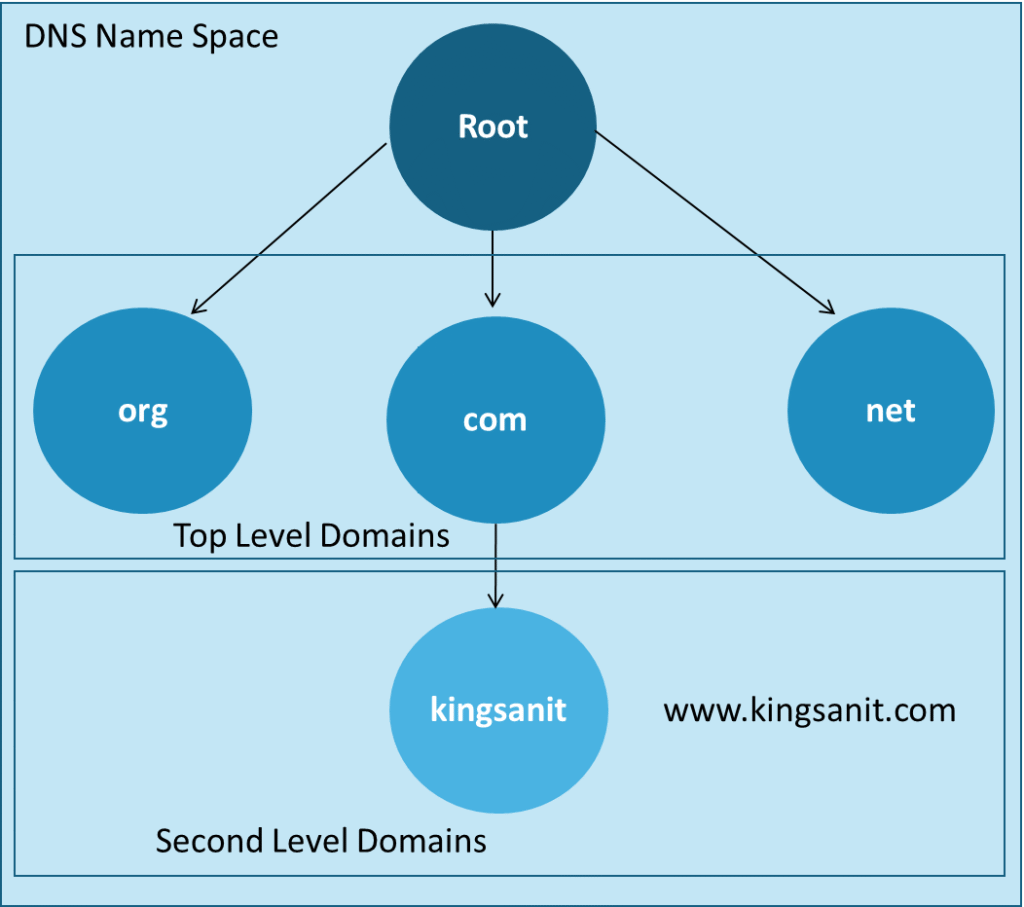
The Root Zone is the foundation of the DNS. The Root Zone has the Root Servers which are the Authoritative Servers for Top Level Domain (TLD) Servers. The Root Domain is the top-most domain represented by dot (.) which is the starting point for the DNS. The Root Zone is maintained by the Internet Corporation for Assigned Names and Numbers (ICANN) which delegates the management to the subsidiary organization Internet Assigned Numbers Authority (IANA) that manages IP addresses and domain names for the whole Internet.
The DNS Name Space is a hierarchical tree structure. The DNS Zone is a portion under the DNS Name Space given to an organization.
The TLD will be at right most, the domains and the sub domain names will go towards the right separated by a dot as delimitator.
An authoritative DNS server is the DNS Server that provide definite answer to the client.
When making a DNS query, a client can request for recursive query and if the DNS server support recursive query, it will fulfill the request by responding itself (if it has authoritative answer or cached answer) and query other DNS servers, if doesn’t have answer with it. The DNS server forwards the request to other DNS server and gets the answer to the client. For non-recursive query (iterative), the client should query different DNS servers till and get the answer itself.
Top Level Domains (TLDs)
| Domain Name | Description |
| Com | Commercial Organizations |
| Org | Non-Profit Organizations |
| Gov | Government Organizations |
| Mil | Military |
| Net | Network Providers |
| Edu | Education Institutions |
| ARPA | DARPA |
| INIT | International Organizations |
| Country Code | Countries code |
Types of TLD
Generic TLD (gTLD) – For common purposes like .Org, .Com, .Net.
Country Code TLD (ccTLD) – For country used by governments like .in (India), .us (USA), .uk (UK).
Sponsored TLDs (sTLD) – For specific groups or organizations or communities like .edu (education) .mil (military), .gov (US Gov).
Infrastructure TLDs – Only .arpa that is for Infrastructure purposes.
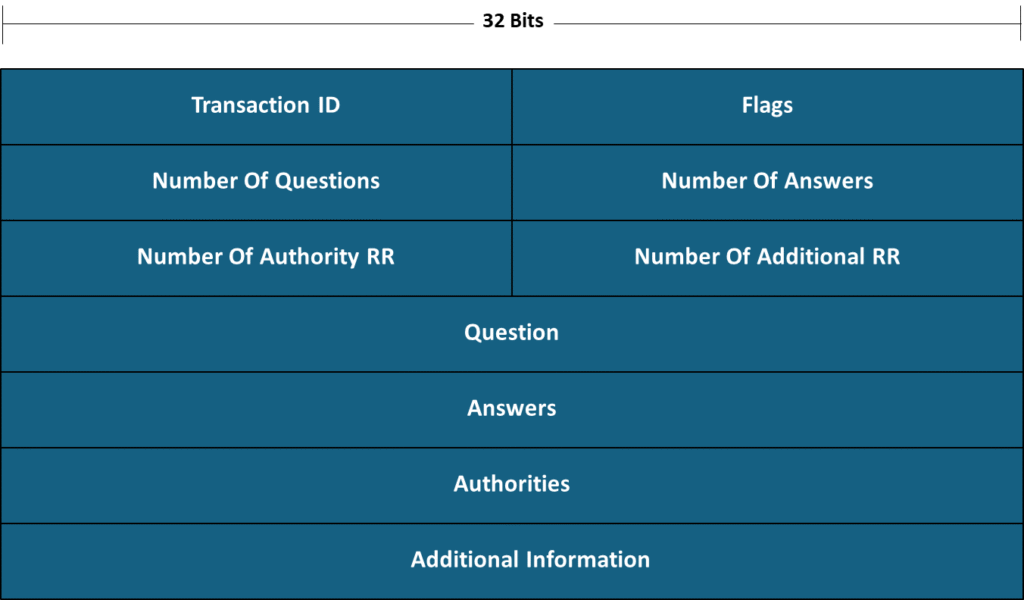
DNS Header
| Field | Length (Bits) | Description |
| Transaction ID | 16 | ID that associates the request and response messages between |
| QR | 1 | Type of message 0 – Query (from client) 1 – Response (from DNS Server) |
| OPCODE | 4 | Type of query set by the client 0 – Standard 1 – Inverse 2 – Not in use 3 – Reserved for future use |
| AA | 1 | Set by the DNS server and informs to the client, if the response is Authoritative or not. 0 – Not Authoritative 1 – Authoritative |
| TC | 1 | Set to indicate that the message was truncated due to its length being longer than the maximum permitted by UDP which is limited to 512 bytes. TCP doesn’t have this challenge of length limit. 0 – Not Truncated 1- Truncated |
| RD | 1 | Set by the client to indicate the DNS server that recursive lookup is required to resolve by sending to other servers till it gets the answer. 0 – Recursion not desired 1 – Recursion desired |
| RA | 1 | Set by the DNS Server to indicate whether recursive lookup is supported or not by the DNS Server. 0 – Recursion not available 1 – Recursion available |
| Z | 3 | Reserved |
| RCODE | 4 | Set by DNS Server in response 0 – No Error 1 – Format Error 2 – Server Failure 3 – Name does not exist |
| Number of Questions | 16 | Number of questions in the question section |
| Number of Answers | 16 | Number of Resource Records in the answer section |
| Number of Authority | 16 | Number of Resource Records in the authority section |
| Number of Additional RR | 16 | Number of Resource Records in the additional section |
DNS Record
A DNS record also known as a resource record (RR) are records that contains human readable parameters like IP address and Domain names stored in the DNS server. A client which wants to connect to another host using it’s DNS name sends a DNS request query to the DNS server. The DNS server checks it’s records and sends back the corresponding IP address to the client. The client then connects to the target host using the IP address. There are different types of DNS Resource Records as following:
| Record Type | Description |
| A | Maps Domain Name to IPv4 address |
| AAAA | Maps Domain Name to IPv6 address. |
| CNAME | Maps an Alias to another Domain Name |
| PTR | Maps IP Address to Domain Name |
| MX | Specifies Mail Server for a Domain |
| SOA | Specifies authoritative information about a DNS zone capturing information like primary name server, domain administrator email address, domain serial number, and different timers relating to the domain zone |
| NS | Specifies Authoritative Name Server for a Domain |
| SRV | Specifies the location (hostname and port number) of servers for specific services. |
| TXT | Specifies some test notes for domain names |
FQDN (Full Qualified Domain Name) also known as Absolute Domain Name is the domain name that specifies the exact location in the DNS hierarchy. The FQDN uniquely identifies an organization using a domain name on the Internet.
For example, www.kingsanit.com is example for FQDN. “kingsanit” is the domain name for the organization which is the second level domain and .com is the Top Level Domain (TLD).
The users who want to access public services hosted on public servers which that are connected to the Internet which is a public network use public DNS for the name resolution.
DNS is also used for Intranet which is private network within an organization for name resolution on enterprise LAN. All the systems like desktops, laptops, server, database connected to LAN will have their own unique hostnames. For name resolution, the internal systems use Internal DNS for accessing internal resources & services and use External/Public DNS for accessing external services.
References
RFC – RFC 1035 – Domain names – implementation and specification